Best Tools for Solopreneurs in 2026: Free and Paid Software That Actually Works
Discover the best tools for solopreneurs in 2026 — CRM, automation, design, invoicing, and AI tools, plus decision frameworks and stacks by business stage.
Best Tools for Solopreneurs in 2026: Free and Paid Software That Actually Works
The best tools for solopreneurs in 2026 aren't the ones with the most features or the loudest marketing. They're the ones that actually remove friction from your day, save you hours each week, and let you focus on client work instead of admin chaos.
After testing over 100 tools and talking to dozens of solo founders running six- and seven-figure businesses, one thing is clear: the magic isn't having more apps — it's having the right few that talk to each other.
This pillar guide covers everything you need to know about solopreneur tools in 2026:
- Decision frameworks for each category (how to actually choose)
- Persona-based stacks (freelancer vs agency vs creator vs coach)
- Comparison tables to see options side by side
- Stage-based recommendations (startup to growth to scale)
- Expanded FAQ covering 25+ common questions
- Internal links to all cluster content (CRM, automation, invoicing, design, PM, MVP)
Let's build your solopreneur operating system.
Table of Contents
- Best Tools for Solopreneurs in 2026: Free and Paid Software That Actually Works
- Quick Comparison: Top Tools at a Glance
- Why Most Solopreneurs Use Too Many Tools (And How to Avoid It)
- How to Choose Tools by Category (Decision Frameworks)
- Solopreneur Tool Stacks by Persona (Use-Case Based)
- Comparison Tables
- Best Tools by Category
- Best Free Tools for Solopreneurs
- Best AI Tools for Solopreneurs in 2026
- Recommended Tech Stack by Business Stage
- Additional Tools Worth Considering
- FAQ
- Conclusion: Build Your Solopreneur Operating System
Quick Comparison: Top Tools at a Glance
| Tool | Category | Best For | Free Plan | Starting Price |
|---|---|---|---|---|
| Notion | Workspace | Documentation and systems | Yes | Free |
| HubSpot CRM | CRM | Lead and client tracking | Yes | Free |
| ClickUp | Project Management | Task workflows | Yes | Free |
| Canva | Design | Visual content | Yes | $12.99/mo |
| Kit | Email Marketing | Creators and newsletters | Yes | $29/mo |
| Zapier | Automation | App connections | Yes | $19.99/mo |
| Make | Automation | Complex workflows | Yes | $9/mo |
| FreshBooks | Invoicing | Payments and expenses | No | $17/mo |
| Hostinger | Website | WordPress hosting | No | ~$3/mo |
| Stripe | Payments | Online transactions | No | 2.9% + $0.30 |
| Calendly | Scheduling | Meeting bookings | Yes | Free |
| ChatGPT Plus | AI | Writing and strategy | Yes (basic) | $20/mo |
Why Most Solopreneurs Use Too Many Tools (And How to Avoid It)
Let me be honest with you: I've been the solopreneur with 25 open tabs, 12 active subscriptions, and still feeling like nothing works together. The problem wasn't the tools — it was the lack of a system.
The real cost of too many tools isn't just monthly fees (though those add up). It's:
- Mental clutter – Where did I save that client file? Was it in Notion or Google Drive?
- Context switching – Jumping between apps 50+ times a day kills deep work
- Duplicate data – Updating the same information in three different places
- Missed follow-ups – Leads fall through cracks because your CRM is a spreadsheet
As I covered in top problems solopreneurs want to solve, most operational headaches are system problems, not tool problems.
The solution: start with one tool per function. Add a second only when the first genuinely can't do what you need. And connect them with automation only when manual repetition becomes painful.
How to Choose Tools by Category (Decision Frameworks)
Before diving into specific tools, here's a framework for making decisions in each category. This will save you hours of research paralysis.
How to Choose a CRM
Ask yourself three questions:
- How many leads do you track monthly? Under 50? HubSpot free is fine. Over 200? You might need paid CRM features.
- Do you need marketing automation? If yes, HubSpot or ActiveCampaign. If no, simpler CRMs work.
- Is your business B2B or B2C? B2B needs pipeline stages (discovery to proposal to negotiation to closed). B2C often needs simpler contact management.
Decision rule: Start with HubSpot free. Switch when you outgrow its lead limits or need advanced reporting.
How to Choose Automation Tools
Ask yourself:
- Are you technical? No to Zapier. Yes to Make.com or n8n.
- How many automations do you need? Under 10 tasks per month? Free tier works. Over 1,000? Paid plan required.
- Do your automations need conditional logic? Simple triggers to Zapier. Complex if/then/else branches to Make.
Decision rule: Use Zapier for the first 3 automations. If you hit complexity walls, migrate to Make.
How to Choose Project Management Software
Ask yourself:
- Do you work solo or with contractors? Solo to Notion or Trello. With team to ClickUp or Asana.
- Do you need time tracking? Yes to ClickUp or Asana. No to Notion works fine.
- How many active projects? Under 10 to Trello. Over 20 to ClickUp or Notion with databases.
Decision rule: Start with Notion. If task dependencies become painful, move to ClickUp.
Solopreneur Tool Stacks by Persona (Use-Case Based)
Not every solopreneur needs the same tools. Here are stacks tailored to specific business models.
Freelancer (Writer, Designer, Developer)
Core stack (under $30 per month): Notion for client projects, deliverables, and SOPs; HubSpot CRM (free) for lead tracking; Canva for portfolio graphics and proposals; FreshBooks for invoicing and time tracking; Calendly for discovery calls; Hostinger for a portfolio website.
Why this works: Freelancers need client tracking, simple invoicing, and a portfolio. This stack covers all three without overlapping functionality.
Content Creator (YouTuber, Newsletter, Course Creator)
Core stack (under $50 per month): Notion for content calendar, scripting, and research; Kit for email newsletter and audience management; Canva Pro for thumbnails, social graphics, and lead magnets; ChatGPT Plus for script outlines, titles, and show notes; Stripe for payments on digital products; Hostinger for landing pages and blog.
Why this works: Creators live and die by content velocity. AI and design tools multiply output while email marketing builds an owned audience.
Agency Owner (Marketing, Design, Dev)
Core stack (under $150 per month): HubSpot CRM for deal pipelines and client tracking; ClickUp for project management with team collaboration; Slack for client communication channels; Make for workflow automation between tools; FreshBooks for team timesheets and client invoicing; Canva Pro for client deliverables and reports.
Why this works: Agencies need structure across multiple clients and possibly contractors. ClickUp and Slack create transparency while automation reduces manual coordination.
Coach or Consultant
Core stack (under $80 per month): HubSpot CRM for lead tracking and discovery call scheduling; Notion for client portals, session notes, and resources; Calendly for booking paid sessions; Stripe for payment processing; Loom for async video feedback and onboarding; Zoom for client sessions.
Why this works: Coaches sell time and expertise. Scheduling automation and client portals reduce administrative friction so you can focus on delivering value.
SaaS Solopreneur
Core stack (under $100 per month): HubSpot CRM for lead tracking and email sequences; Notion for product roadmap and documentation; Zapier for user onboarding automation; Stripe for subscription payments; Intercom (or similar) for basic customer support; Hostinger for marketing site and blog.
Why this works: SaaS requires lead capture, onboarding automation, and payment infrastructure. This stack covers the basics without enterprise pricing.
Comparison Tables
CRM Comparison: HubSpot vs Alternatives
| Feature | HubSpot (Free) | Zoho CRM (Free) | Pipedrive | Folk |
|---|---|---|---|---|
| Contact limit | 1M | 5,000 | Unlimited (paid) | 1,000 free |
| Deal pipelines | Yes | Yes | Yes | Yes |
| Email tracking | Yes | No | Yes (paid) | No |
| Meeting scheduler | Yes | No | No | Yes |
| Automation | Basic | Limited | Advanced (paid) | No |
| Best for | Most solopreneurs | Small sales teams | B2B sales agencies | Relationship-focused |
| Free plan | Yes | Yes | No | Yes (limited) |
Verdict: HubSpot wins for most solopreneurs because of the generous free tier and built-in meeting scheduler.
For a deeper CRM analysis, see Best CRM Tools for Solopreneurs in 2026.
Automation Comparison: Zapier vs Make vs n8n
| Feature | Zapier | Make | n8n |
|---|---|---|---|
| Ease of use | Very easy | Moderate | Technical |
| Free tier ops/month | 100 | 1,000 | 5 |
| Visual workflow builder | Linear | Visual map | JSON/code-heavy |
| Conditional logic | Basic | Advanced | Very advanced |
| Best for | Non-technical founders | Power users | Developers |
| Starting price (paid) | $19.99/mo | $9/mo | Self-hosted free |
Verdict: Start with Zapier. Move to Make when your workflows need branching logic.
See Best Automation Tools for Solopreneurs for workflow examples.
Project Management Comparison
| Feature | Notion | ClickUp | Trello | Asana |
|---|---|---|---|---|
| Free plan | Unlimited blocks | Yes | Unlimited boards | Up to 15 users |
| Task dependencies | No | Yes | No | Yes (paid) |
| Time tracking | Manual | Built-in | Via power-up | Built-in |
| Documentation | Excellent | Good | No | Good |
| Best for | All-in-one workspace | Feature-heavy teams | Visual workflows | Mid-sized teams |
| Learning curve | Moderate | Steep | Low | Moderate |
Verdict: Notion for solopreneurs who want an all-in-one system. ClickUp for advanced task management. Trello for simplicity.
Check Best Project Management Tools for Solopreneurs for more details.
Best Tools by Category
Best Workspace: Notion
Notion isn't just a note-taking app. It's the operating system for your entire solo business. The free plan is generous with unlimited blocks for personal use.
Why it's the best: flexible databases, a massive template ecosystem, and the ability to scale from simple to-do lists to complex workflows.
Related: How Solopreneurs Stay Productive and Grow Their Business
Best CRM: HubSpot
Many solopreneurs resist CRMs for years. HubSpot's free plan solves that problem, with deal pipelines, email tracking, a meeting scheduler, and basic automation included.
When to upgrade: paid tiers ($45+/month) add sequences and advanced reporting. Most solopreneurs won't need this until 100+ active leads monthly.
Best Project Management: ClickUp
Think of Notion as your brain and ClickUp as your task manager. The free tier includes unlimited tasks, docs, time tracking, and basic automation.
Alternatives: Notion (all-in-one), Trello (simplicity), Asana (teams).
Best Design: Canva
Before Canva, solopreneurs either paid designers or made ugly assets themselves. The free plan gives thousands of templates, while Pro ($12.99/mo) adds a background remover, brand kit, and AI generation.
Related: Best Design Tools for Solopreneurs and SMBs.
Best Email Marketing: Kit
Kit (formerly ConvertKit) is built for creators, with a free plan up to 1,000 subscribers. Free alternative: Sender, free up to 2,500 subscribers.
Best Automation: Zapier vs Make
Automation is the closest thing to cloning yourself. Zapier is beginner-friendly, while Make is more powerful and often cheaper.
Deep dive: Best Automation Tools for Solopreneurs.
Best Invoicing: FreshBooks
Chasing payments is soul-crushing. FreshBooks automates the cycle with professional invoices that include a pay-now button, automatic reminders, and expense tracking. Free alternative: Wave Accounting.
Related: Best Invoicing Tools for Solopreneurs.
Best Website Hosting: Hostinger
Your website is your digital HQ. Hostinger gives WordPress hosting at roughly $3/month with a free domain included.
Related: Best Tools to Build an MVP as a Solopreneur.
Best Free Tools for Solopreneurs
| Category | Free Tool | Limitations |
|---|---|---|
| Workspace | Notion | Unlimited personal use |
| CRM | HubSpot | 1M contacts |
| Design | Canva | Millions of templates |
| Sender | 2,500 subscribers | |
| Project Mgmt | Trello | Unlimited boards |
| Scheduling | Calendly | One event type |
| Automation | Zapier | 100 tasks/month |
| Accounting | Wave | Free invoicing |
The $0 stack: Notion + HubSpot + Canva + Sender + Trello + Calendly + Wave.
Best AI Tools for Solopreneurs in 2026
ChatGPT Plus ($20/month)
Useful for drafting proposals, brainstorming, creating SOPs, summarizing calls, and research.
Perplexity ($20/month or free)
Research without sponsored garbage. Essential for consultants and content creators.
Notion AI (add-on)
Summarizes notes, helps write docs, and answers questions about your content.
Canva AI (included in Pro)
Magic Media, Magic Write, and Magic Eraser reduce design time significantly.
The AI rule: use AI to go from 0 to 80% faster, then manually polish the last 20%.
Recommended Tech Stack by Business Stage
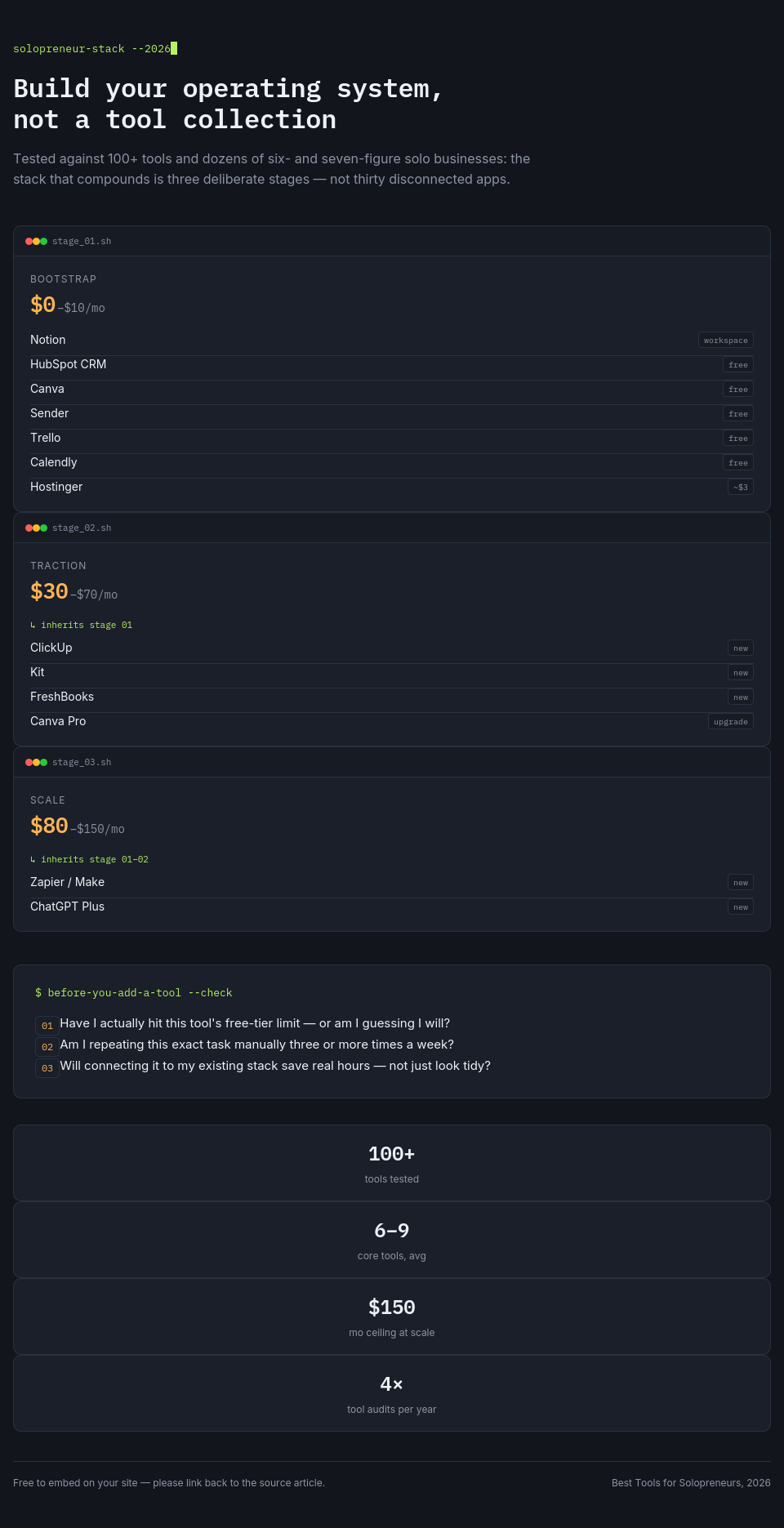
Stage 1 — Starting Out ($0 to $10 per month)
Notion + HubSpot CRM + Canva + Sender + Trello + Calendly + Hostinger (~$3/mo).
Stage 2 — Getting Paying Clients ($30 to $70 per month)
Add: ClickUp, Kit, FreshBooks, Canva Pro.
Stage 3 — Scaling Operations ($80 to $150 per month)
Add: Make/Zapier, ChatGPT Plus.
Related: Best Tools for Solopreneurs to Scale Service Businesses.
Additional Tools Worth Considering
| Tool | Category | Best For |
|---|---|---|
| Wise | Finance | International payments |
| Grammarly | Writing | Editing and tone |
| Buffer | Social media | Scheduling posts |
| Loom | Communication | Async video |
| Slack | Communication | Client channels |
| Stripe | Payments | Online transactions |
FAQ
Basics and Selection
What tools do solopreneurs actually need?
At minimum: a workspace (Notion), a way to manage leads (HubSpot free CRM), an invoicing method (FreshBooks or Wave), and a website (Hostinger). That's under $20/month for a fully functional business.
How many tools should a solopreneur use?
Most successful solopreneurs use 6 to 9 core tools. More than 12 usually means you're collecting apps instead of solving problems. Audit your subscriptions quarterly.
What's the cheapest functional solopreneur tech stack?
Notion (free) + HubSpot CRM (free) + Canva (free) + Sender (free) + Hostinger (~$3/mo) + Calendly (free) comes to under $5/month, and this runs a real business.
Can I run a business with free tools only?
Yes. The free stack above works until you hit 1,000 leads, 2,500 email subscribers, or need advanced automation. Many solopreneurs stay free for 6 to 12 months.
What tools replace hiring employees?
Automation tools (Zapier/Make) replace manual data entry. AI tools (ChatGPT) replace junior writers or researchers. CRMs (HubSpot) replace sales admins. Canva replaces a designer for basic needs.
CRM Questions
What is the best CRM for solopreneurs?
HubSpot CRM is the best free option. It includes deal pipelines, contact management, email tracking, and meeting scheduling, with no credit card required.
Is HubSpot CRM really free?
Yes. The free plan includes 1 million contacts (you'll never hit this), deal pipelines, email tracking, a meeting scheduler, and basic automation, with no time limit.
When should I upgrade from free CRM?
Upgrade when you need sequences (automated follow-up emails), advanced reporting, or team features. Most solopreneurs don't need paid CRM until 100+ active leads monthly.
What's better than HubSpot for solopreneurs?
For relationship-heavy businesses (investors, partners), Folk is better. For advanced sales automation, Pipedrive wins. For most, HubSpot is the right starting point.
Automation Questions
Do solopreneurs need automation tools?
Not immediately. Automation becomes important when you find yourself doing the same manual task more than three times weekly. That's typically at Stage 2 or 3.
What's the easiest automation tool for beginners?
Zapier. The interface is simple (if this happens, then do that), and there are templates for almost every use case.
What's the cheapest automation tool?
Make.com's free tier gives you 1,000 operations per month, ten times Zapier's free tier. Paid plans start at $9 per month, half of Zapier's entry price.
Can I automate without paying?
Yes. Both Zapier and Make offer free tiers. IFTTT is another free option for simple automations.
Project Management Questions
What's the best project management tool for solo founders?
Notion for all-in-one (docs + tasks). ClickUp for pure task management. Trello for visual simplicity.
Is Notion good for project management?
Yes for light project management (under 20 active projects, no task dependencies). No for complex workflows (task dependencies, resource allocation).
What's easier: Notion or ClickUp?
Notion is easier to start (blank page, add as you go). ClickUp has more structure but a steeper learning curve.
Finance and Payments
What's the best free invoicing tool?
Wave. It offers free invoicing, receipt scanning, and basic accounting, with no credit card required.
What's better: FreshBooks or QuickBooks?
FreshBooks is simpler and better for service businesses (hourly billing, client invoicing). QuickBooks is better for product businesses or complex accounting needs.
How do I get paid faster?
Use Stripe with pay-now buttons on invoices, automatic payment reminders (FreshBooks does this), and offer multiple payment methods (credit card, bank transfer, digital wallet).
AI Tools
What AI tools should solopreneurs use?
ChatGPT Plus ($20/mo) is the most versatile. Perplexity is best for research. Notion AI if you live in Notion. Canva Pro for AI design.
Is ChatGPT worth the monthly fee?
Yes if you use it daily for writing, research, strategy, or brainstorming. The free tier is noticeably worse than the paid Plus tier.
Can AI replace my work?
No. AI accelerates your work from 0 to 80%. Your expertise, judgment, and client relationships complete the final 20%. Treat AI as an assistant, not a replacement.
Website and Hosting
What's the best website builder for solopreneurs?
WordPress (via Hostinger) for SEO and control. Squarespace for simplicity and design. Choose based on your priorities.
Do I need a website as a solopreneur?
Yes. Social media platforms change algorithms and can ban you. Your website is the one asset you fully own. Start with a simple one-page site.
How much should I spend on hosting?
Under $10/month is fine for most solopreneurs. Hostinger ($3/mo) and SiteGround ($3 to $15/mo) are solid options. Avoid $1/mo hosting, since it tends to be slow and unreliable.
Email Marketing
What's the best email marketing tool for beginners?
Kit (free up to 1,000 subscribers) for creators. Sender (free up to 2,500 subscribers) for budget. Mailchimp (free up to 500 subscribers) for simplicity.
Do I need email marketing as a solopreneur?
Yes. Email is the only channel you own. Social followings can disappear. Email lists cannot, as long as you export regularly.
How often should I email my list?
Weekly works for most solopreneurs. Less than monthly and subscribers forget you. More than daily and they unsubscribe. Test what works for your audience.
Scaling and Growth
What tools help solopreneurs scale?
Automation tools (Zapier/Make) remove manual work. CRMs (HubSpot) systematize sales. Project management (ClickUp) organizes delivery. AI tools multiply output.
When should I hire instead of using tools?
Hire when the tool's limitations cost you more than an employee's salary. For example, if you spend 20 hours weekly on tasks a VA could do for $500/month, hire the VA.
What's the number one tool mistake solopreneurs make?
Using too many disconnected tools instead of a few integrated ones. The goal is a system, not a collection.
Conclusion: Build Your Solopreneur Operating System
The best tools for solopreneurs aren't the ones with the most features. They're the ones you actually open every day without dread.
Your action plan:
- Start with the Stage 1 stack. Use it for 30 days.
- Identify your biggest friction point.
- Add one tool at a time from Stage 2 or 3.
- Connect them with automation only when manual repetition hurts.
- Review quarterly. Cancel what you don't use.
TL;DR — best tools for solopreneurs 2026 by category: workspace is Notion (free); CRM is HubSpot (free); project management is ClickUp (free) or Notion; design is Canva (free or Pro); email is Kit or Sender (free); automation is Zapier or Make; invoicing is FreshBooks or Wave (free); website is Hostinger (~$3/mo); AI is ChatGPT Plus ($20/mo); scheduling is Calendly (free).
Start with the free stack. Upgrade only when you hit real limitations. Build systems, not tool collections.