Running a business alone sounds exciting — until you realize you are the marketer, designer, accountant, customer support agent, and CEO at the same time.
Without the right tools, a solopreneur can quickly become overwhelmed.
The numbers explain why:
- 64% of small business owners work more than 40 hours per week (U.S. Small Business Administration).
- 82% of small businesses fail because of poor cash flow management (U.S. Bank study).
- Solopreneurs spend over 30% of their time on repetitive admin tasks instead of growing their business.
In other words:
Most solopreneurs fail not because they lack talent — but because they lack systems.
The good news is that modern software can replace entire departments.
With the right tech stack you can:
- automate marketing
- manage customers
- design content
- handle payments
- analyze traffic
- run operations
—all without hiring a team.
But here is the problem.
If you search for “best tools for solopreneurs,” most articles simply list dozens of random tools.
That only makes things more confusing.
So in this guide I did something different.
Instead of listing everything, I researched the most useful tools solopreneurs actually use and organized them into a complete operating system for a one-person business.
You will discover:
- the 20 best solopreneur tools
- honest pros and cons of each
- which tools are worth paying for
- which tools have free plans
- a simple tech stack if you’re starting from zero
If I were starting a solo business today, these are the tools I would use.
table of contents
Open table of contents
- Quick Comparison: Best Tools for Solopreneurs
- Best Email Marketing Tools for Solopreneurs
- 1. Kit (ConvertKit)
- 2. AWeber
- 3. Sender
- Best Website & Landing Page Tools
- 4. Leadpages
- 5. Hostinger
- Best Design Tools
- 6. Canva Pro
- 7. Adobe Express
- 8. HubSpot CRM
- 9. Flowlu
- 10. Notion
- 11. Semrush
- 12. SE Ranking
- 13. Jotform
- 14. Jasper AI
- 15. Writesonic
- 16. Grammarly
- 17. FreshBooks
- 18. Wise
- 19. Calendly
- 20. Zapier
- Tech Stack for Solopreneurs Starting From Zero
- Free vs Paid Tools
- Buyer’s Guide: How to Choose Solopreneur Tools
- FAQ
- What tools do solopreneurs need?
- What is the best CRM for solopreneurs?
- What is the best email marketing tool for solopreneurs?
- What is the best free design tool?
- What is the best automation tool?
- Do solopreneurs need SEO tools?
- Are AI tools necessary?
- What is the cheapest way to start?
- How many tools should a solopreneur use?
- Can one tool replace everything?
- Conclusion
Quick Comparison: Best Tools for Solopreneurs
This table gives you a quick overview before we dive deeper.
| Tool | Category | Best For | Free Plan | Starting Price |
|---|---|---|---|---|
| Kit (ConvertKit) | Email marketing | Creators & newsletters | Yes | $29/mo |
| AWeber | Email marketing | Beginners | Yes | $15/mo |
| Sender | Email marketing | Free email marketing | Yes | $10/mo |
| Leadpages | Landing pages | Lead generation | No | $49/mo |
| Hostinger | Website hosting | Affordable websites | No | ~$2.99/mo |
| Canva Pro | Design | Content creation | Yes | $12.99/mo |
| Adobe Express | Design | Professional graphics | Yes | $9.99/mo |
| HubSpot CRM | CRM | Managing customers | Yes | Paid upgrades |
| Flowlu | CRM + projects | All-in-one business system | Yes | $29/mo |
| Notion | Productivity | Notes & workspace | Yes | $8/mo |
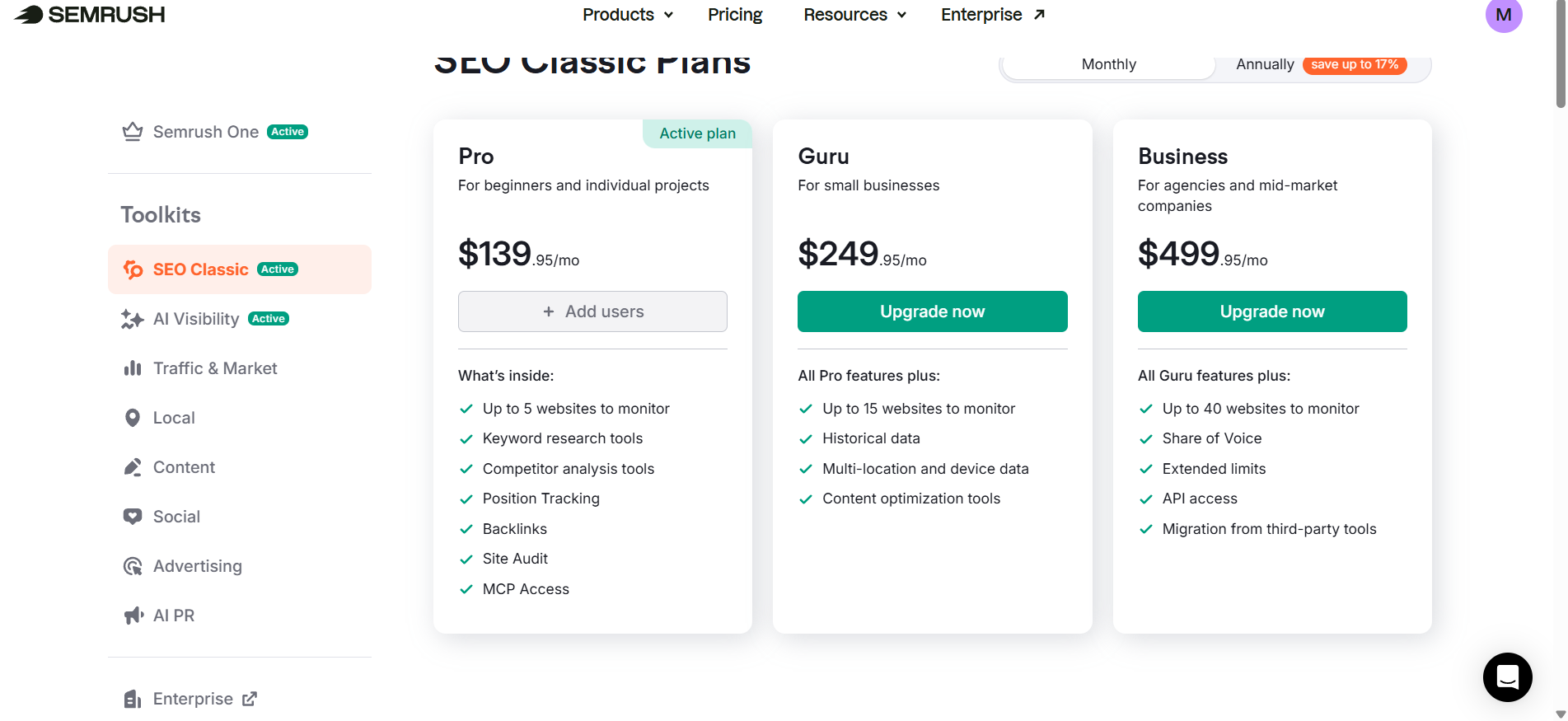
| Semrush | SEO | Advanced marketing | No | $129/mo |
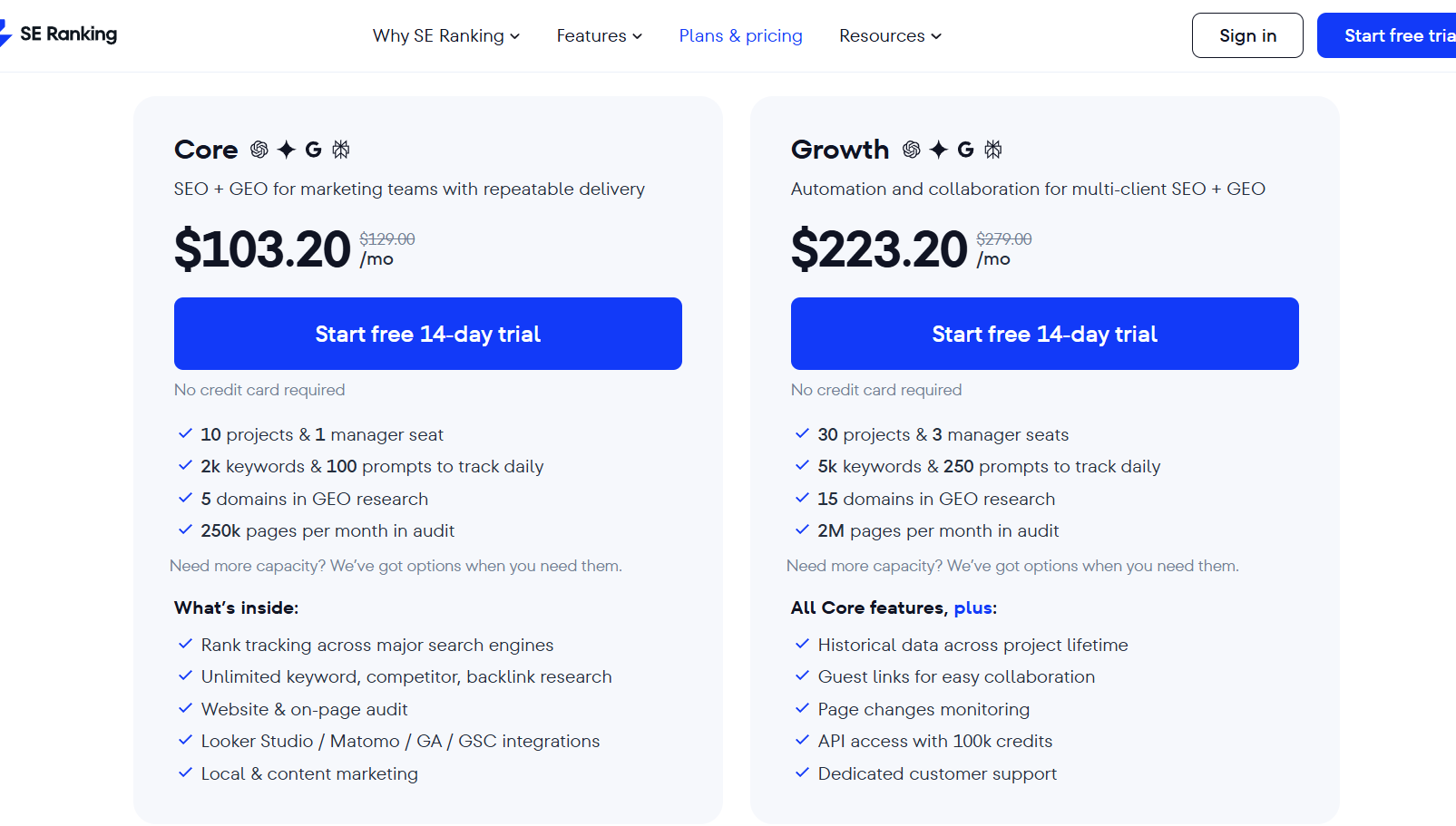
| SE Ranking | SEO | Budget SEO | Yes | $44/mo |
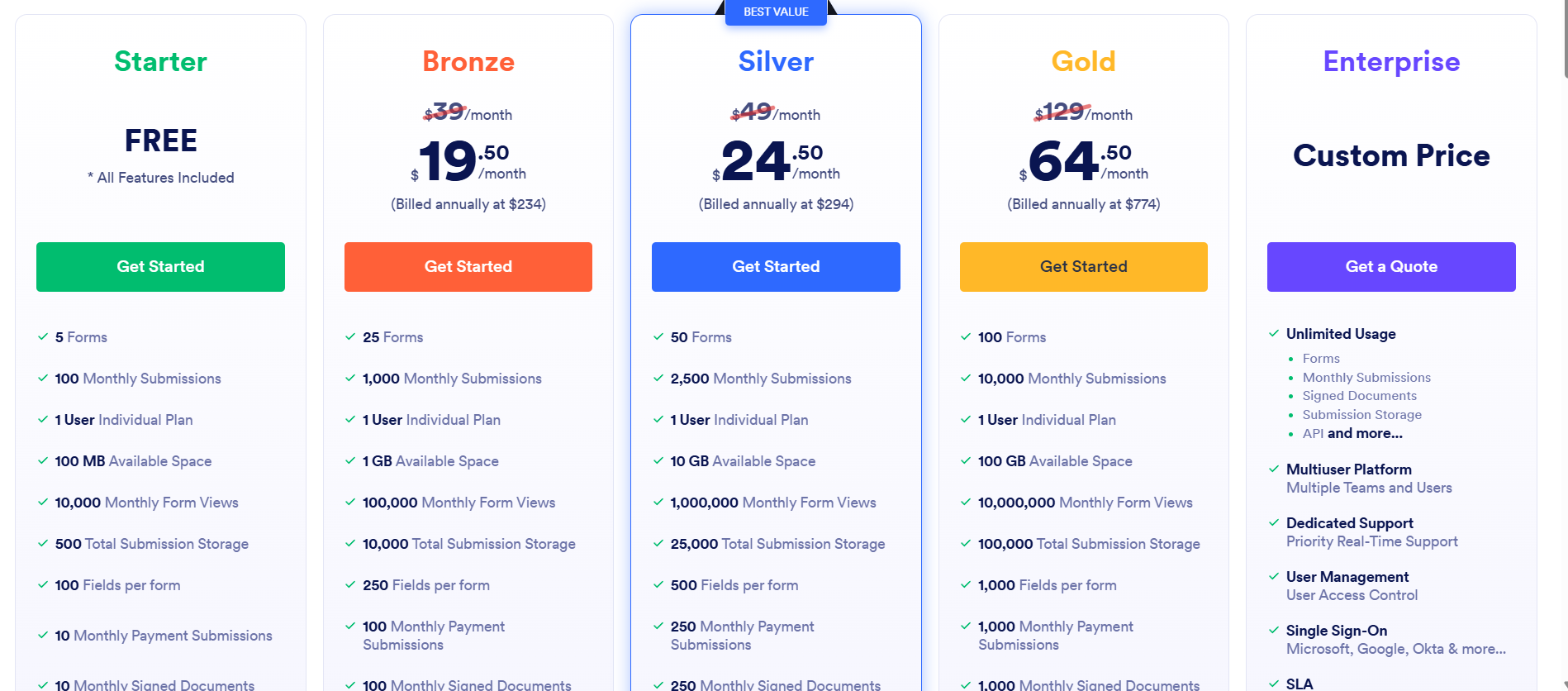
| Jotform | Forms | Lead capture | Yes | $34/mo |
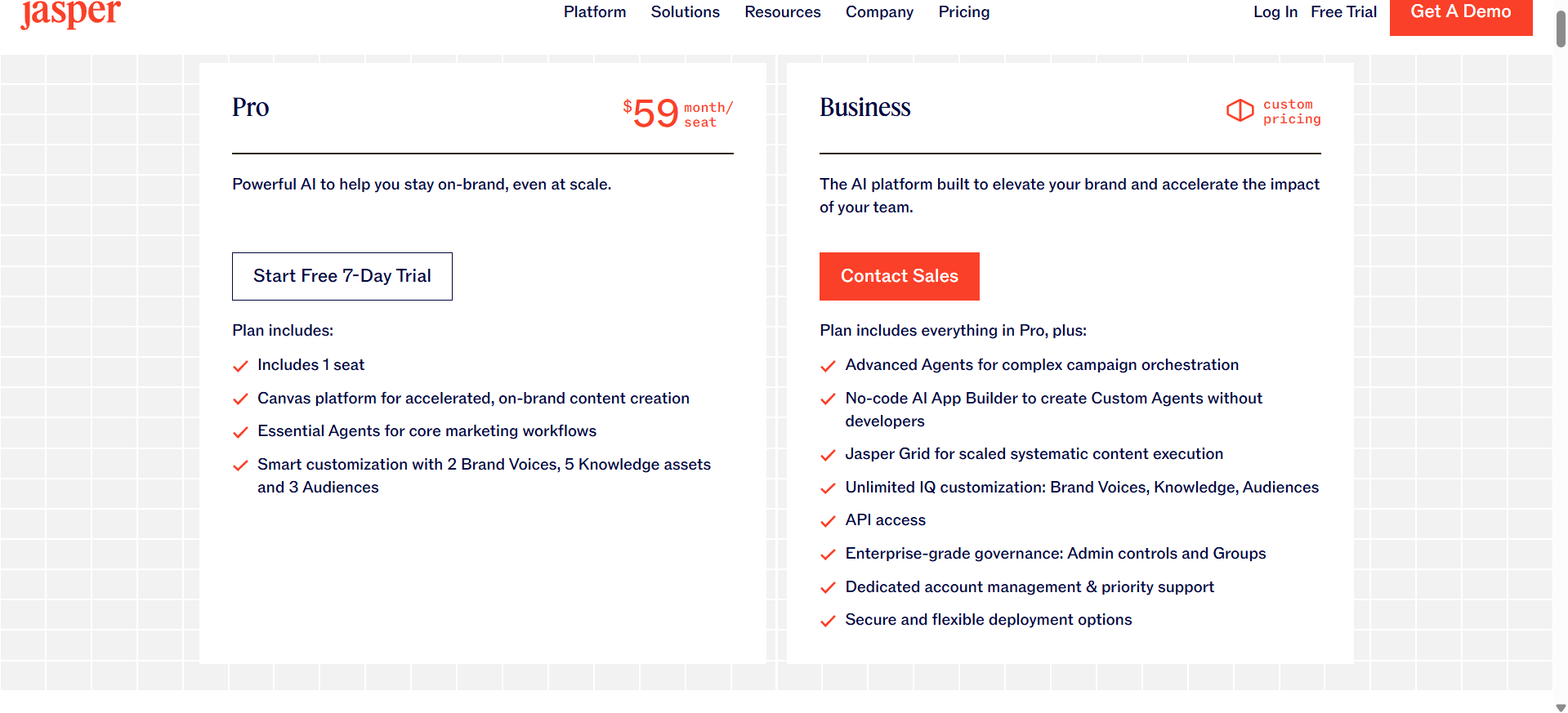
| Jasper AI | AI writing | Marketing copy | No | $49/mo |
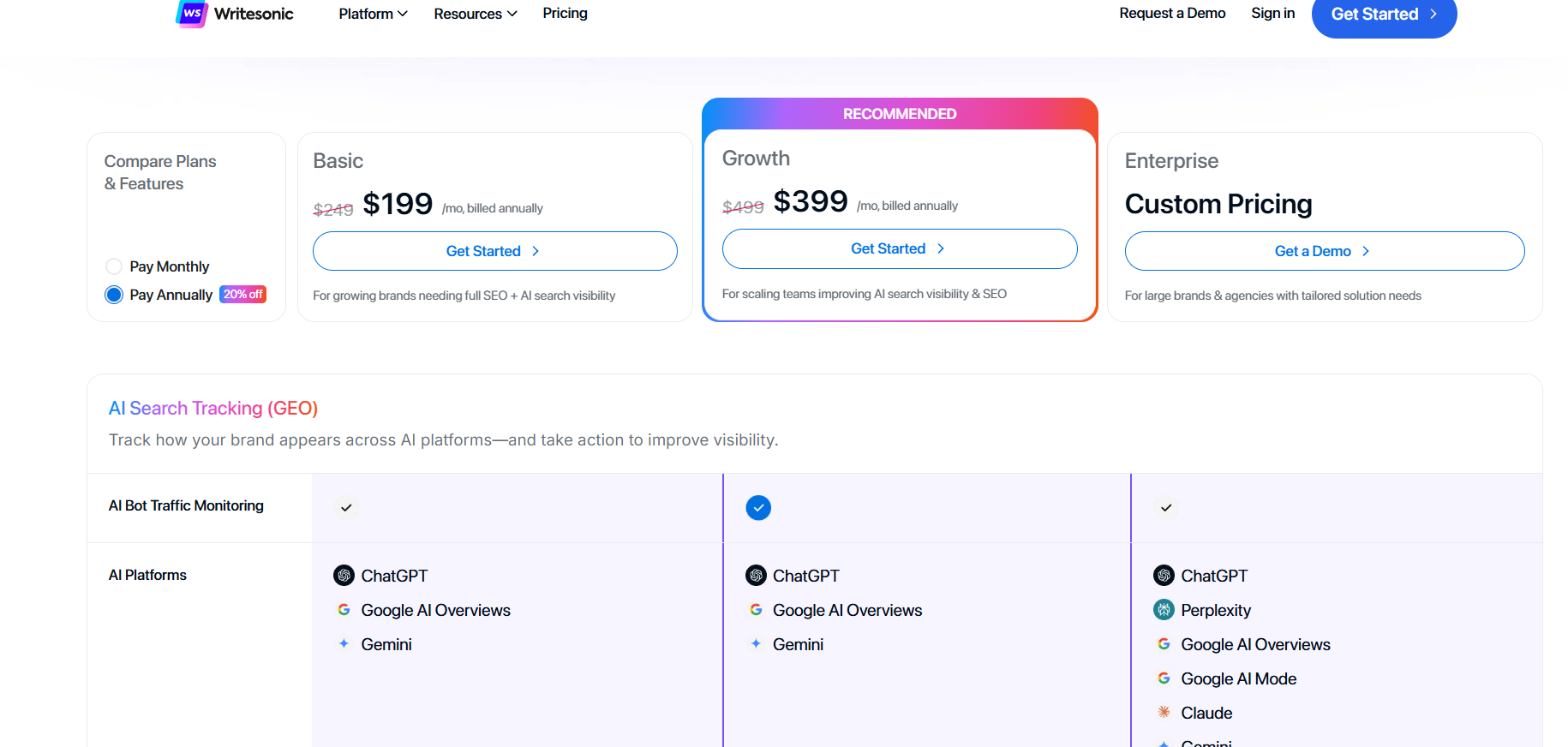
| Writesonic | AI writing | Affordable AI content | Yes | $20/mo |
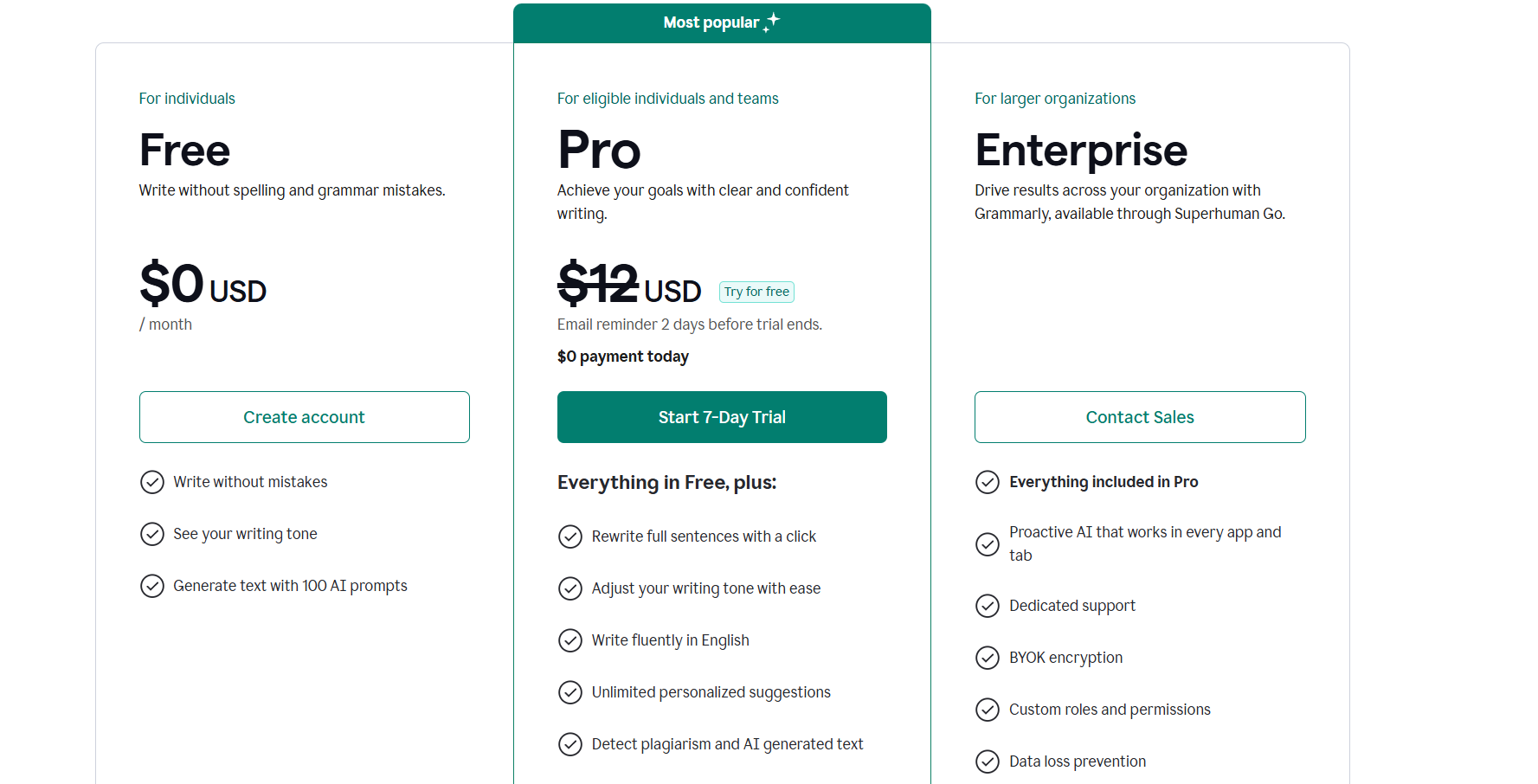
| Grammarly | Writing | Grammar & editing | Yes | $12/mo |
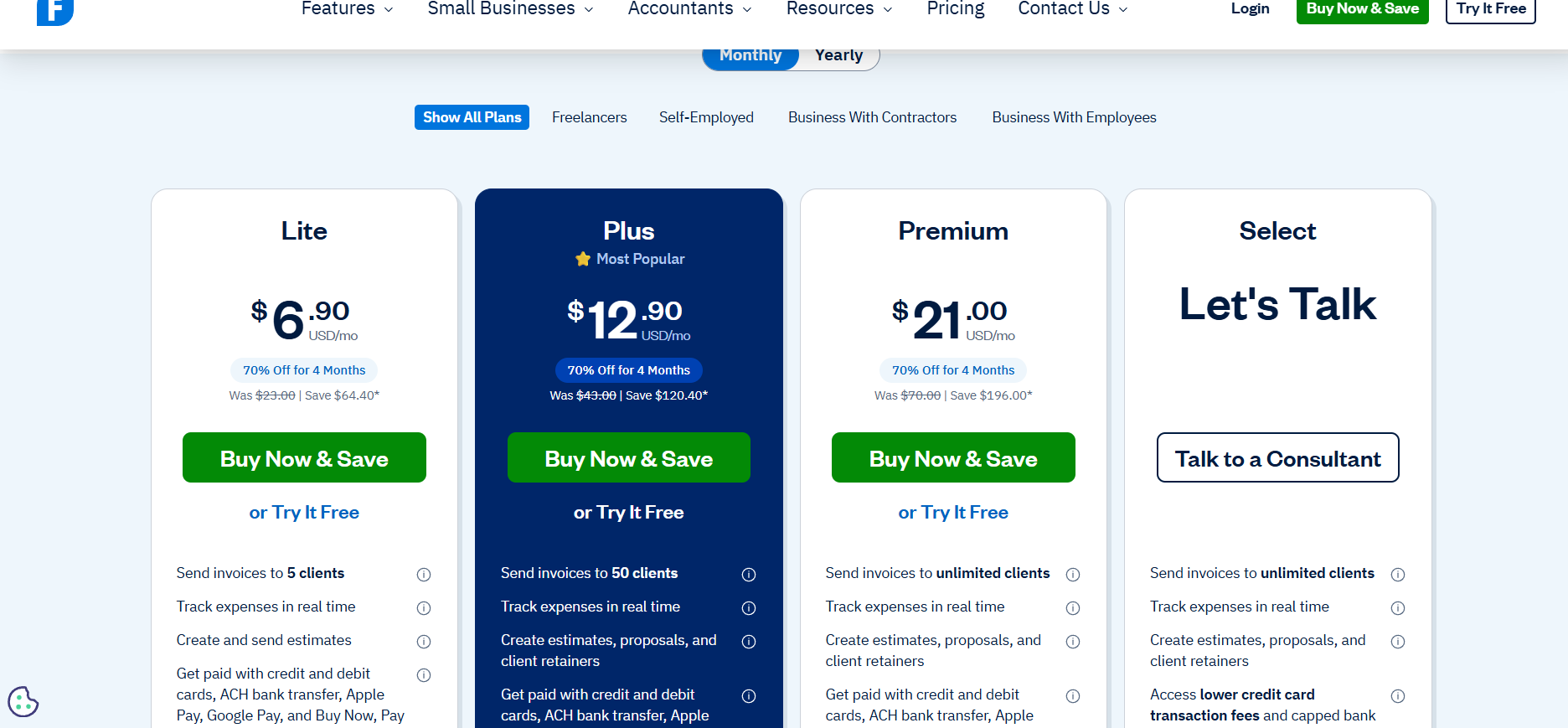
| FreshBooks | Accounting | Invoices & finance | No | $17/mo |
| Wise | Payments | International transfers | Yes | transaction fee |
| Calendly | Scheduling | Booking meetings | Yes | $10/mo |
| Zapier | Automation | Connecting apps | Yes | $20/mo |
Best Email Marketing Tools for Solopreneurs
Email marketing is still the highest ROI marketing channel.
Studies show email generates $36 for every $1 spent.
For solopreneurs, email is even more powerful because it allows you to own your audience instead of relying on social media algorithms.
1. Kit (ConvertKit)
Best for: creators, bloggers, and solopreneurs building an audience.
Product overview
Kit (formerly ConvertKit) is an email marketing platform designed specifically for creators and independent entrepreneurs.
Unlike traditional email tools built for big corporations, Kit focuses on simplicity and automation.
You can:
- build email newsletters
- create landing pages
- sell digital products
- automate email sequences
All from one dashboard.
Many well-known creators rely on Kit because it allows them to grow an audience without complicated software.
Key features

- Visual email automation builder
- Landing page builder
- Creator commerce tools
- Subscriber tagging
- Email sequences
- Newsletter analytics
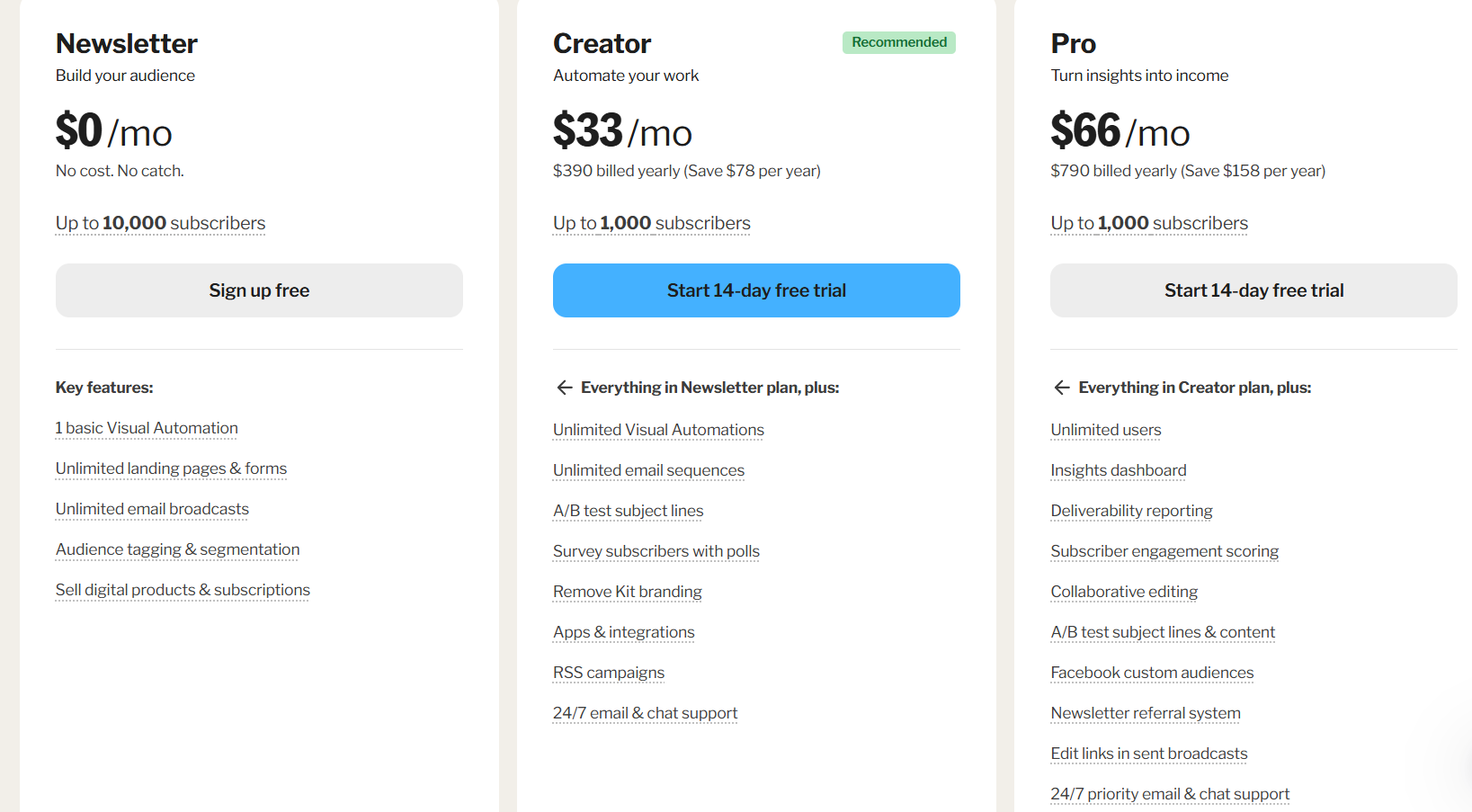
Pricing
What’s wrong with it?
Reviews on sites like G2 and Capterra mention two common issues:
- pricing increases as your email list grows
- limited template design compared to competitors
Unique selling point
Kit focuses entirely on creator businesses, making it easier to use than most enterprise email platforms.
Benefits
- powerful automation
- clean interface
- great for newsletters
Pros vs Cons
| Pros | Cons |
|---|---|
| Easy to use | Gets expensive at scale |
| Excellent automation | Limited templates |
| Built for creators |
2. AWeber
Best for: beginners starting email marketing.
Product overview
AWeber is one of the oldest email marketing platforms, founded in 1998.
Its biggest advantage is simplicity.
You can create:
- newsletters
- automated campaigns
- landing pages
- signup forms
within minutes.
Key features
- drag-and-drop email builder
- email automation
- landing page builder
- list segmentation
- analytics
Pricing
 Free plan available.
Paid plans start around $20/month.
What’s wrong with it?
- automation is less powerful than newer tools
- interface feels slightly outdated
Unique selling point
AWeber combines ease of use with affordable pricing, making it perfect for beginners.
Pros vs Cons
| Pros | Cons |
|---|---|
| Very beginner friendly | Basic automation |
| Affordable | UI not modern |
| Free plan |
3. Sender
Best for: solopreneurs who want powerful free email marketing.
Product overview
Sender is one of the most generous free email marketing platforms.
You can send thousands of emails per month without paying anything.
That makes it ideal for new solopreneurs who are bootstrapping.
Key features
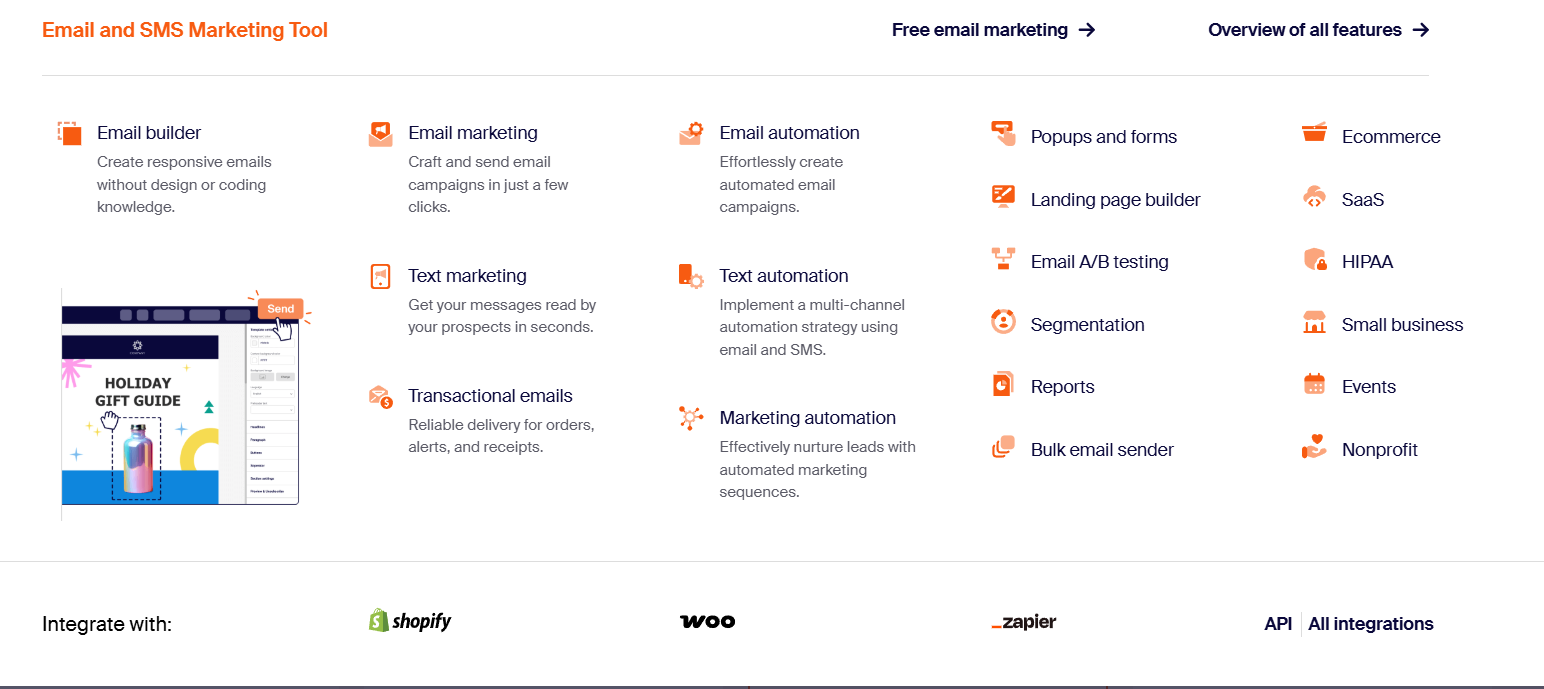
- automation workflows
- drag-and-drop builder
- SMS marketing
- segmentation
- analytics
Pricing
 Free plan includes 2500 subscribers and 15000 emails per month.
Paid plans start around $10/month.
Unique selling point
Sender offers enterprise-level features in the free plan.
Pros vs Cons
| Pros | Cons |
|---|---|
| Excellent free plan | Smaller ecosystem |
| Easy automation | Fewer integrations |
Best Website & Landing Page Tools
Your website is the foundation of your online business.
Without one, you rely entirely on social platforms you don’t control.
4. Leadpages
Best for: creating high-converting landing pages.
Overview
Leadpages is designed to help solopreneurs capture leads and grow email lists.
Instead of building a full website, you can quickly create conversion-optimized landing pages.
Key features
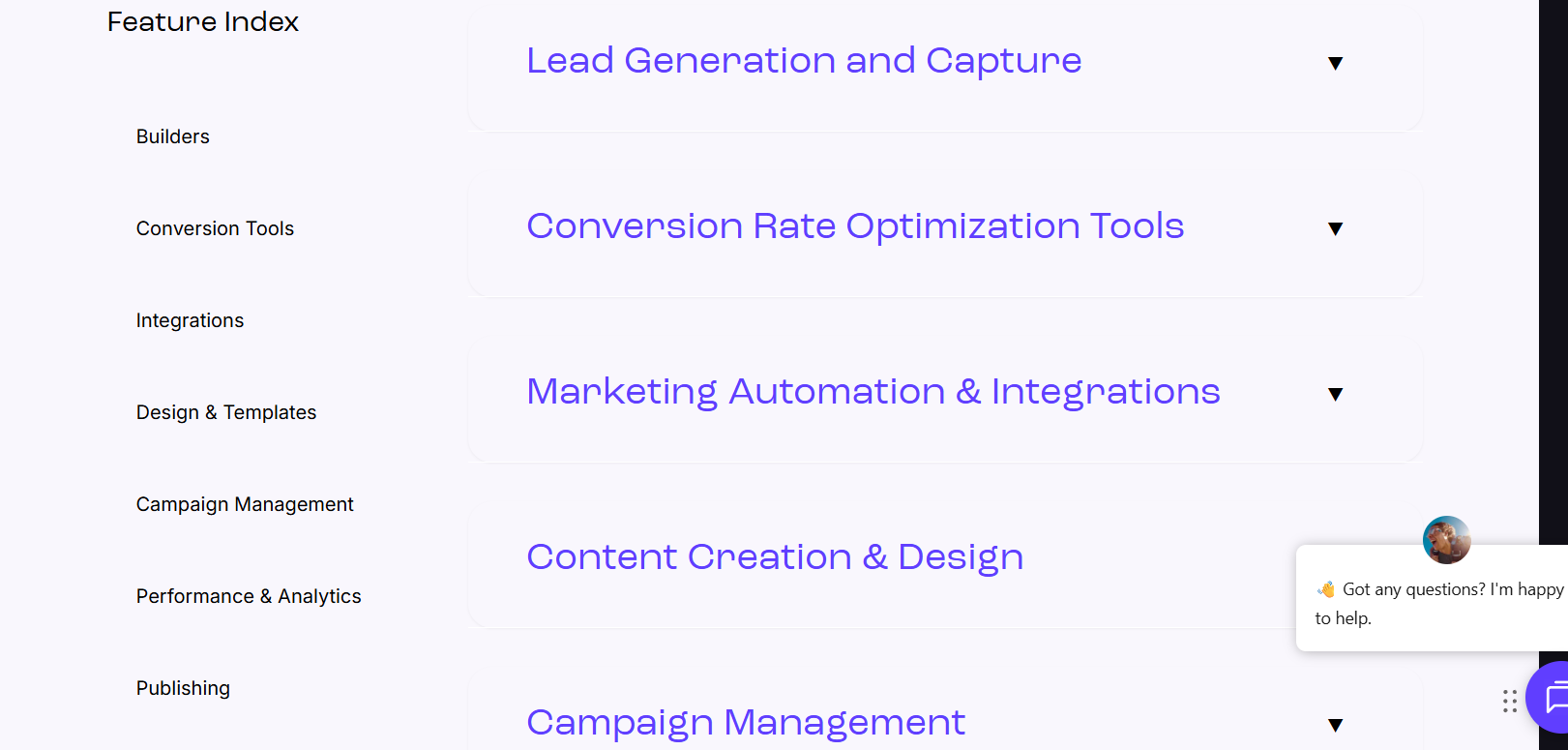
- landing page templates
- conversion analytics
- popups
- lead capture forms
- A/B testing
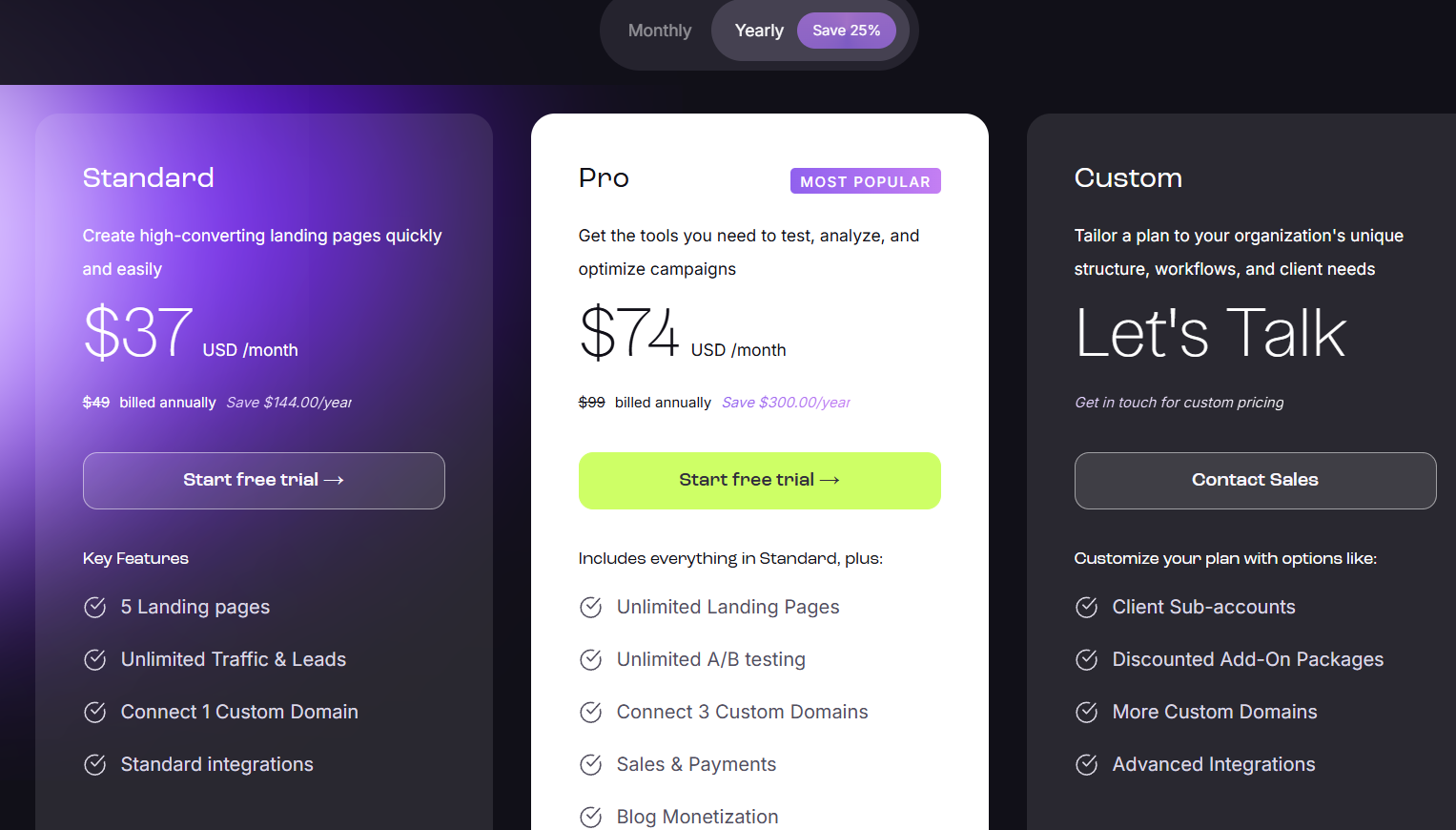
Pricing
What’s wrong with it?
- expensive compared to website builders
- limited design flexibility
Unique selling point
Leadpages focuses entirely on conversions and lead generation.
5. Hostinger
Best for: affordable website hosting.
Overview
Hostinger is one of the most affordable hosting providers available.
Many solopreneurs choose it because it allows them to launch a website for just a few dollars per month.
Key features
- fast hosting servers
- WordPress optimization
- free SSL
- website builder
- domain registration
Hostinger Pricing
Hostinger offers very affordable hosting plans starting from a low monthly cost. his makes Hostinger one of the cheapest hosting providers available.
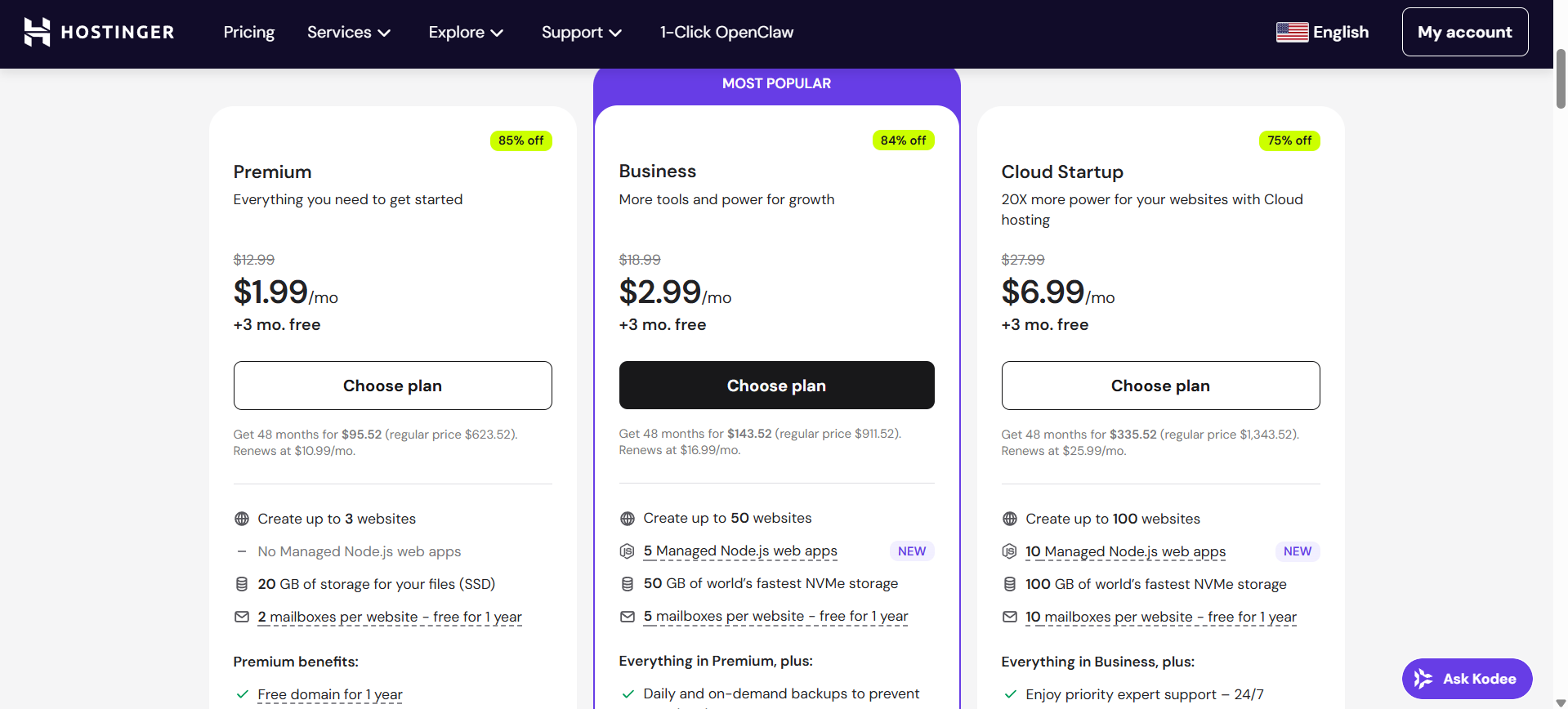
Hosting starts around $2.99/month. check site as prices may change due to prromotions and events/deals.
Unique selling point
Hostinger delivers excellent performance at a very low price.
Best Design Tools
Design is essential for:
- social media
- marketing
- presentations
- lead magnets
Hiring a designer for every graphic is expensive, which is why these tools exist.
6. Canva Pro
Best for: fast content creation.
Overview
Canva has become the default design tool for solopreneurs.
You can design:
- social posts
- YouTube thumbnails
- ebooks
- presentations
- marketing graphics
in minutes.
Key features
- 100k+ templates
- drag-and-drop editor
- brand kits
- background remover
- AI design tools
Pricing
 Free version available.
Downsides
- limited advanced design control
- templates can feel generic
7. Adobe Express
Product overview
Adobe Express is Adobe’s simplified design platform built for creators, marketers, and small businesses.
It sits somewhere between Canva and professional tools like Photoshop.
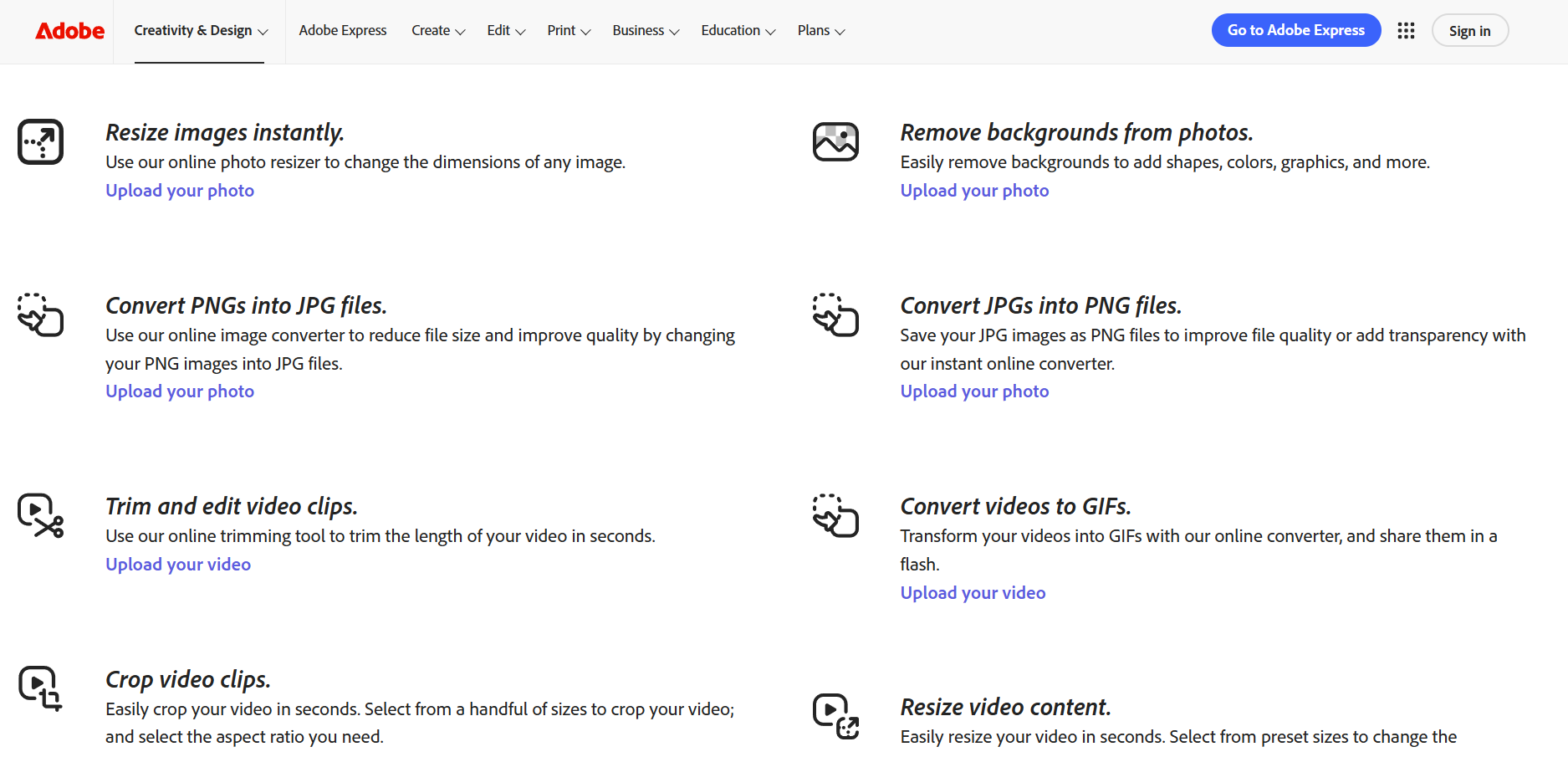
Solopreneurs use Adobe Express to create:
- social media graphics
- short videos
- marketing materials
- flyers and presentations
Because it integrates with Adobe’s ecosystem, it works especially well for people who already use Photoshop, Illustrator, or Lightroom.
Key features
- Drag-and-drop design editor
- Thousands of templates
- Adobe Stock photos
- Quick video editing
- Background removal
- Brand kits
- AI text-to-image tools
Pricing
Adobe Express offers a free plan.
Premium plans start around $9.99/month.

Pricing may change over time.
What’s wrong with it?
Based on reviews from sites like G2 and Trustpilot:
- fewer templates compared to Canva
- interface sometimes feels slower
- some premium assets require Adobe subscriptions
Unique selling position
Adobe Express combines easy design tools with Adobe’s professional asset library.
Benefits
- professional-quality graphics
- simple interface
- strong brand customization tools
Pros vs Cons
| Pros | Cons |
|---|---|
| Professional templates | Fewer templates than Canva |
| Adobe ecosystem integration | Interface occasionally slow |
| Free plan available | Some assets locked |
8. HubSpot CRM
Best for: solopreneurs who want a powerful free CRM.
Product overview
HubSpot CRM is one of the most popular CRM systems in the world.
Unlike many CRM platforms, HubSpot offers an extremely generous free plan, which makes it perfect for solopreneurs.
You can use HubSpot to:
- manage leads
- track customer interactions
- store contact data
- automate follow-ups
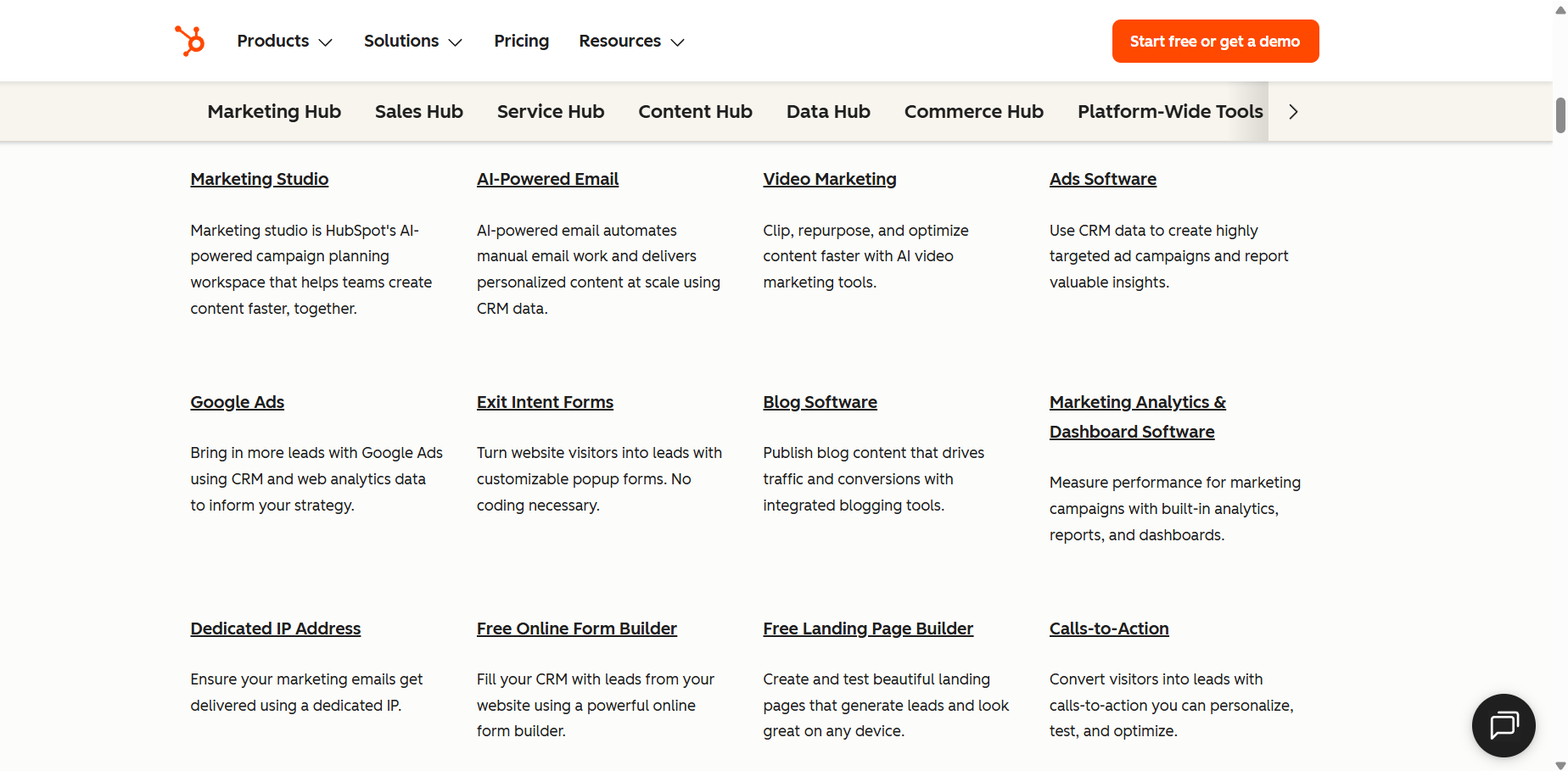
Key features
- Contact and lead management
- Email tracking
- Sales pipelines
- Marketing automation
- Meeting scheduling
- Reporting dashboards
Pricing
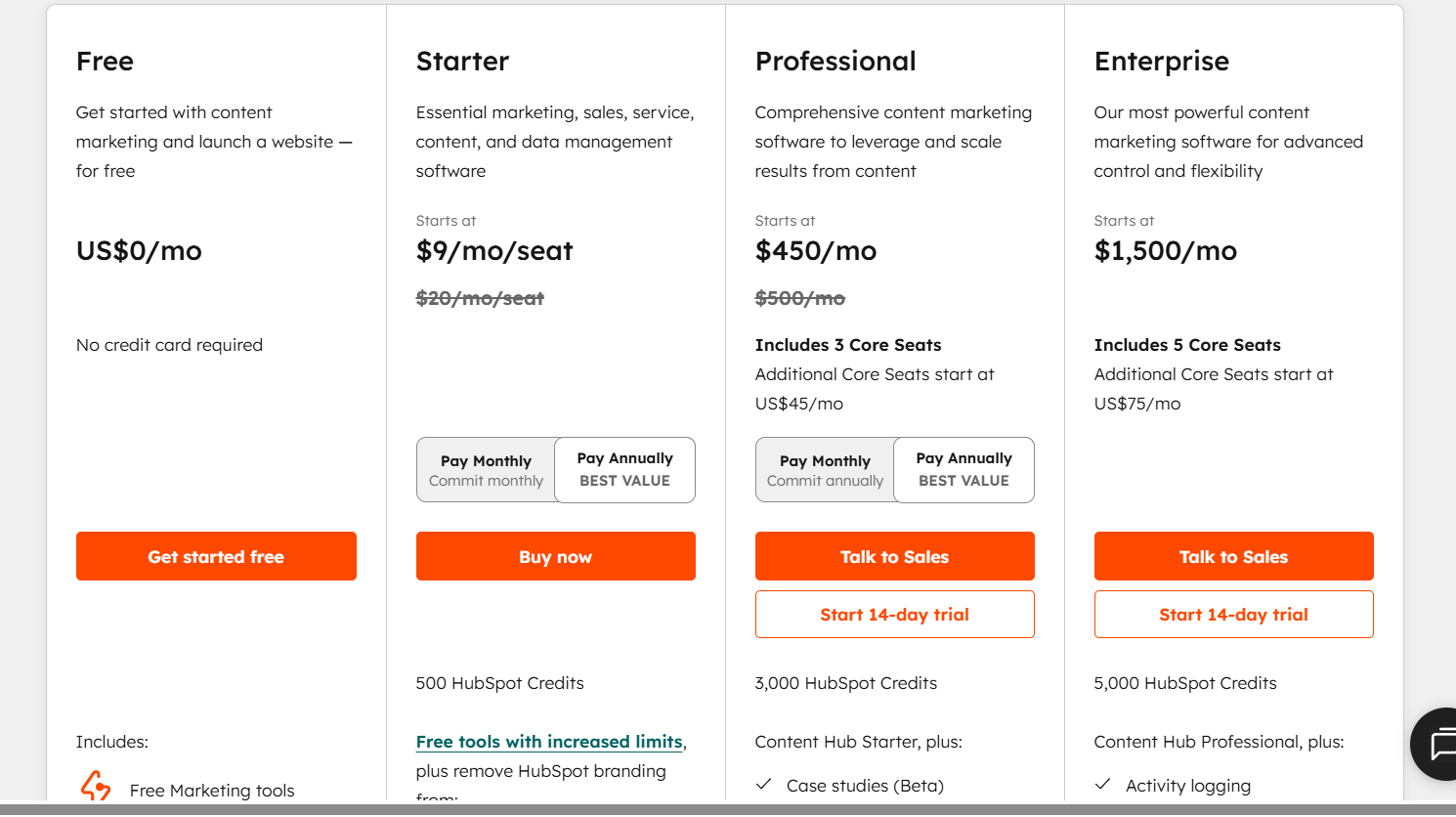
HubSpot CRM itself is free.
What’s wrong with it?
Common complaints from review platforms:
- advanced features become expensive
- some automation tools are locked behind high-tier plans
Unique selling position
HubSpot provides enterprise-level CRM capabilities for free.
Benefits
- powerful contact management
- scalable platform
- integrates with many apps
Pros vs Cons
| Pros | Cons |
|---|---|
| Generous free plan | Paid upgrades expensive |
| Powerful CRM features | Learning curve |
| Huge integration ecosystem |
9. Flowlu
Best for: solopreneurs who want an all-in-one business management platform.
Product overview
Flowlu combines several tools into one platform.
Instead of using separate apps for CRM, invoicing, and project management, Flowlu lets you manage everything in one dashboard.
This can simplify operations for solopreneurs.
Key features
- CRM system
- project management
- invoicing and finance tracking
- knowledge base
- client portals
- workflow automation
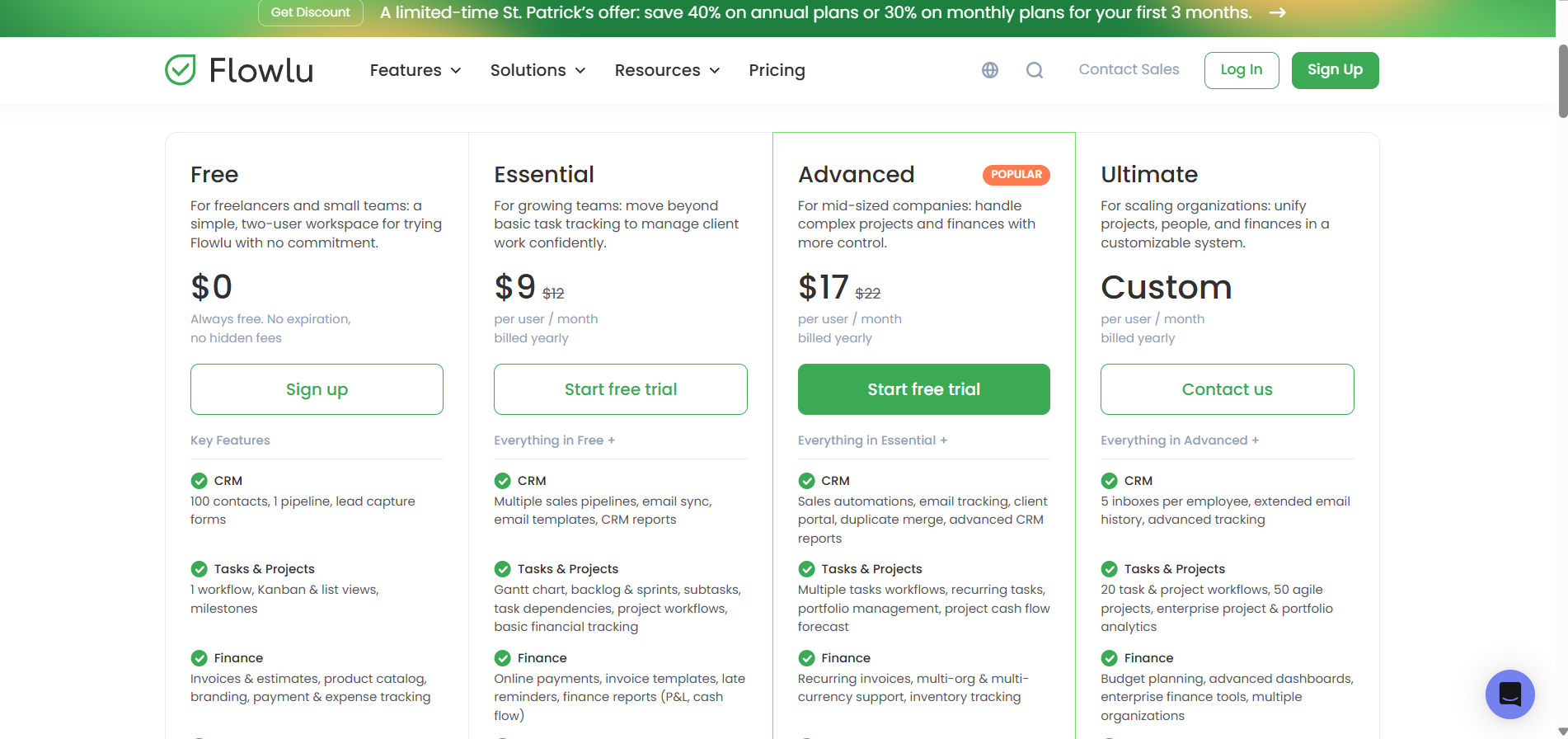
Pricing
Flowlu has a limited free plan.
What’s wrong with it?
Review sites often mention:
- interface feels slightly outdated
- mobile app is less polished
Unique selling position
Flowlu acts as a complete business operating system.
Benefits
- reduces the need for multiple tools
- strong project management
- built-in invoicing
Pros vs Cons
| Pros | Cons |
|---|---|
| All-in-one system | UI not very modern |
| Good project tools | Mobile app weaker |
| Built-in finance tracking |
10. Notion
Best for: productivity, documentation, and organization.
Product overview
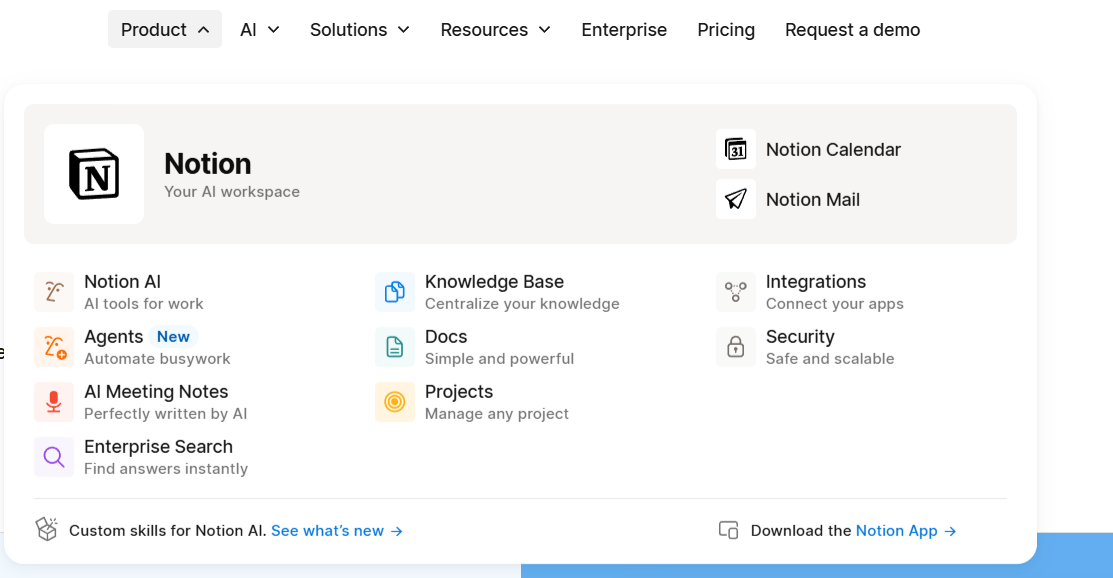
Notion is a flexible workspace used by millions of creators and startups.
It combines:
- note-taking
- task management
- databases
- documentation
into a single platform.
Many solopreneurs use Notion as their “second brain.”
Key features
- note-taking workspace
- databases and tables
- task management
- templates
- collaboration tools
- AI writing assistant
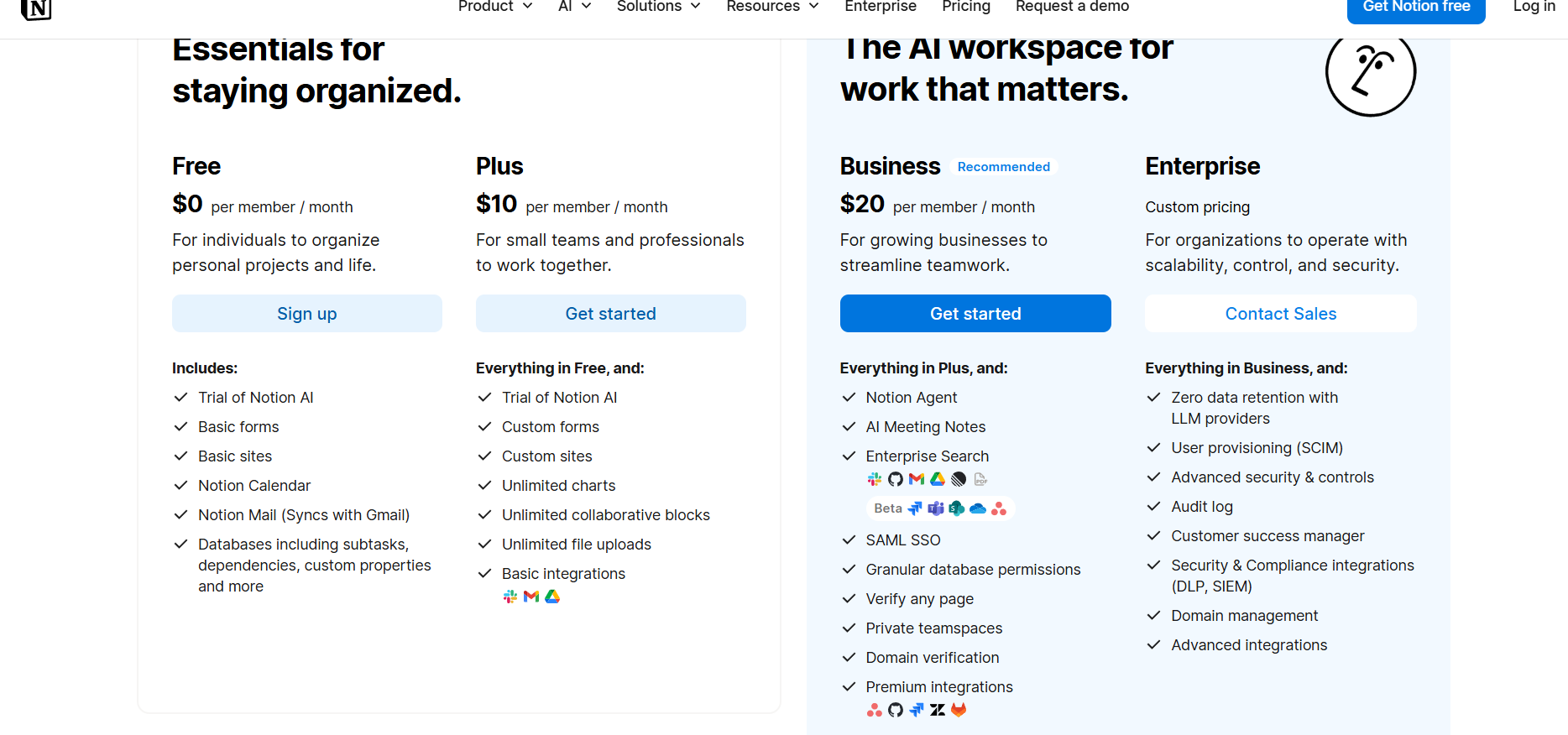
Pricing
Free plan available.
What’s wrong with it?
Common complaints include:
- learning curve for beginners
- performance slows with large databases
Unique selling position
Notion combines multiple productivity tools into one flexible workspace.
Benefits
- extremely customizable
- powerful knowledge management
- replaces multiple tools
Pros vs Cons
| Pros | Cons |
|---|---|
| Highly customizable | Learning curve |
| Free plan available | Can become complex |
| Huge template ecosystem |
11. Semrush
Best for: advanced SEO and marketing research.
Product overview
Semrush is one of the most powerful digital marketing tools available.
It helps businesses analyze:
- keywords
- competitors
- backlinks
- advertising strategies
Many large companies and agencies rely on Semrush.
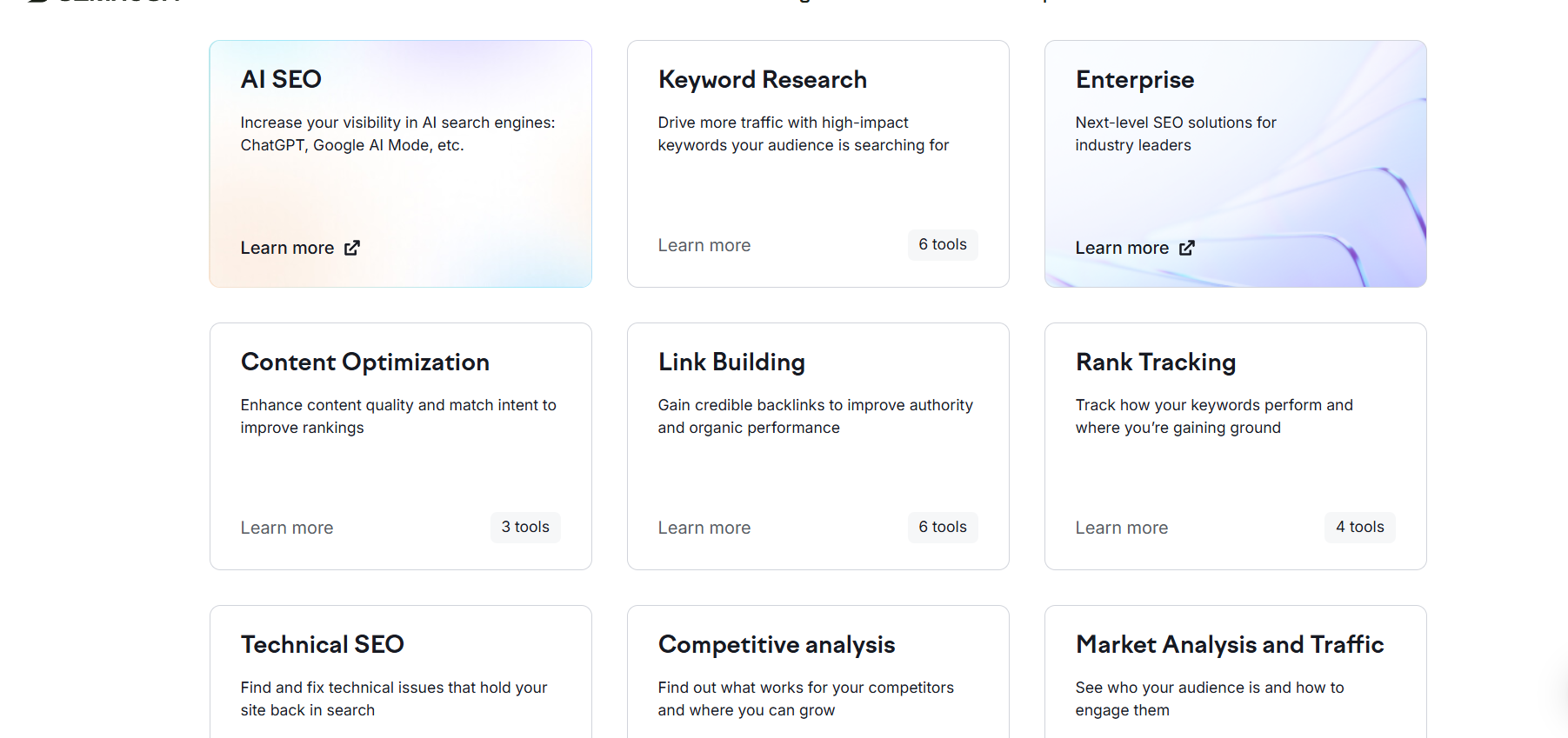
Key features
- keyword research
- competitor analysis
- backlink analysis
- site audit
- rank tracking
- content marketing tools
Pricing
What’s wrong with it?
The biggest complaints:
- expensive for beginners
- data limits on lower plans
Unique selling position
Semrush provides one of the largest marketing data sets in the industry.
Benefits
- powerful competitor insights
- advanced keyword research
- detailed site audits
Pros vs Cons
| Pros | Cons |
|---|---|
| Industry-leading data | Expensive |
| Powerful SEO tools | Complex interface |
| Excellent competitor research |
12. SE Ranking
Best for: affordable SEO research.
Product overview
SE Ranking is a popular alternative to Semrush.
It offers many of the same features but at a much lower price.
Key features
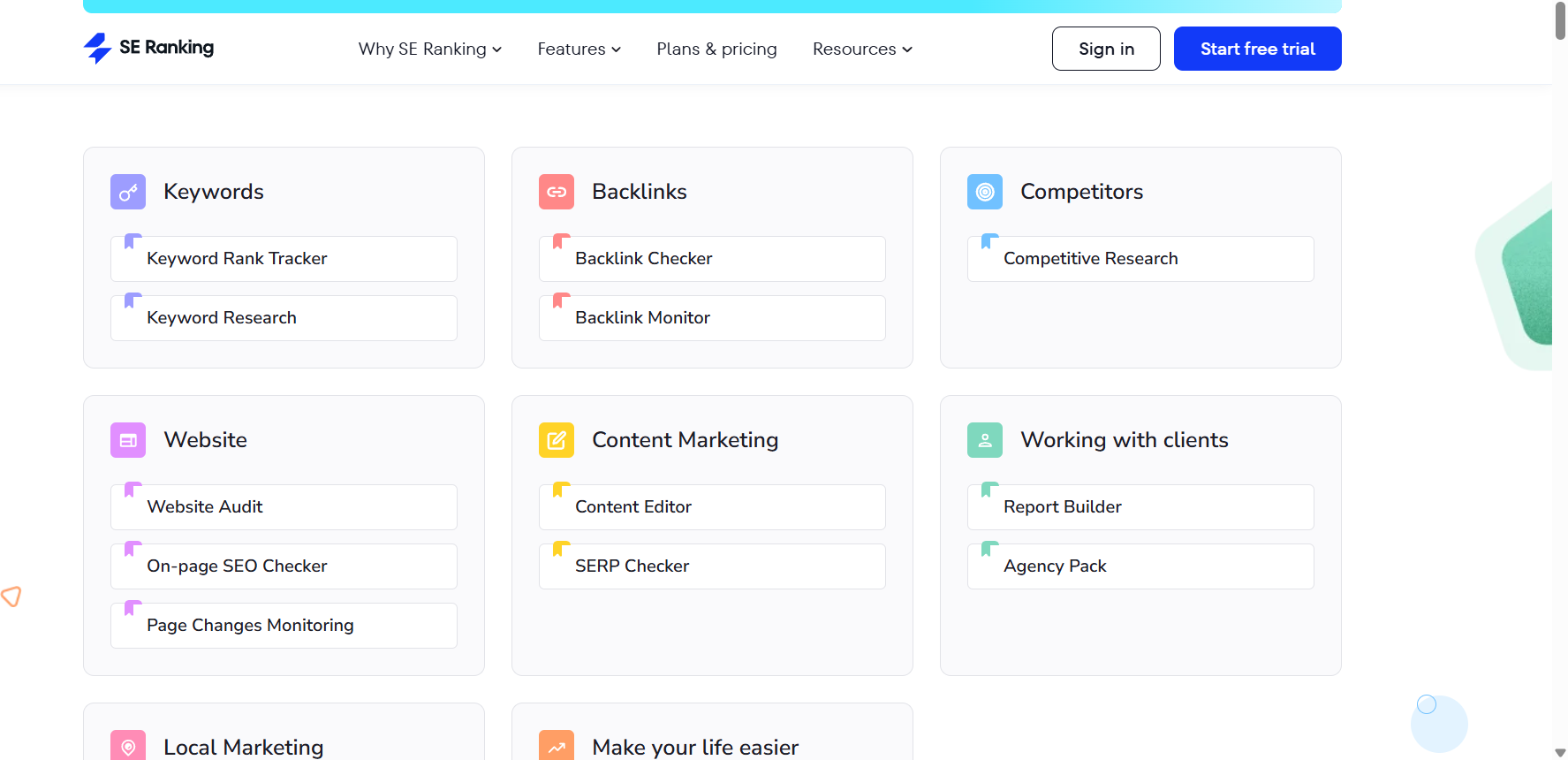
- keyword tracking
- website audit
- competitor analysis
- backlink monitoring
- marketing reports
Pricing
What’s wrong with it?
- smaller keyword database than Semrush
- fewer advanced marketing tools
Unique selling position
SE Ranking provides professional SEO tools at an affordable price.
Benefits
- great value for money
- simple interface
- good reporting tools
Pros vs Cons
| Pros | Cons |
|---|---|
| Affordable | Smaller database |
| Easy to use | Fewer advanced features |
13. Jotform
Best for: building forms without coding.
Product overview
Jotform allows businesses to create professional forms quickly.
You can build:
- contact forms
- surveys
- payment forms
- lead generation forms
without writing any code.
Key features
- drag-and-drop form builder
- conditional logic
- payment integrations
- templates
- automation workflows
Pricing
Free plan available.
Pros vs Cons
| Pros | Cons |
|---|---|
| Easy form creation | Free plan limited |
| Strong integrations | UI slightly cluttered |
14. Jasper AI
Best for: AI marketing content.
Product overview
Jasper is an AI tool designed for marketers and content creators.
It helps generate:
- blog posts
- product descriptions
- advertising copy
- social media content
Key features
- AI content generation
- marketing templates
- brand voice training
- collaboration tools
Pricing
Pros vs Cons
| Pros | Cons |
|---|---|
| High-quality AI writing | Expensive |
| Great marketing templates | Requires editing |
15. Writesonic
Best for: affordable AI writing tools.
Product overview
Writesonic offers similar features to Jasper but at a lower cost.
It is widely used by bloggers and marketers.
Key features
- AI blog writing
- ChatGPT-like chatbot
- marketing templates
- SEO tools
Pricing
Pros vs Cons
| Pros | Cons |
|---|---|
| Affordable AI tool | Output sometimes generic |
| Many templates | Requires editing |
16. Grammarly
Best for: improving writing quality.
Product overview
Grammarly is one of the most widely used writing assistants.
It helps writers improve:
- grammar
- clarity
- tone
- readability
Key features
- grammar checking
- plagiarism detection
- AI rewriting
- tone suggestions
Pricing
Free plan available.
Pros vs Cons
| Pros | Cons |
|---|---|
| Very accurate grammar checks | Premium features expensive |
| Works across apps |
17. FreshBooks
Best for: freelancers managing invoices.
Product overview
FreshBooks is accounting software designed for freelancers and small businesses.
Key features
- invoicing
- expense tracking
- time tracking
- financial reports
Pricing
Pros vs Cons
| Pros | Cons |
|---|---|
| Simple accounting | Limited advanced accounting |
| Great invoicing tools |
18. Wise
Best for: international money transfers.
Product overview
Wise helps businesses send and receive money globally with lower fees than banks.
Key features
- multi-currency accounts
- low international transfer fees
- debit cards
- global payments
Pros vs Cons
| Pros | Cons |
|---|---|
| Low fees | Not a full bank |
| Multi-currency support |
19. Calendly
Best for: scheduling meetings automatically.
Product overview
Calendly allows clients to book meetings without back-and-forth emails.
Key features
- calendar integrations
- automated scheduling
- reminders
- payment integrations
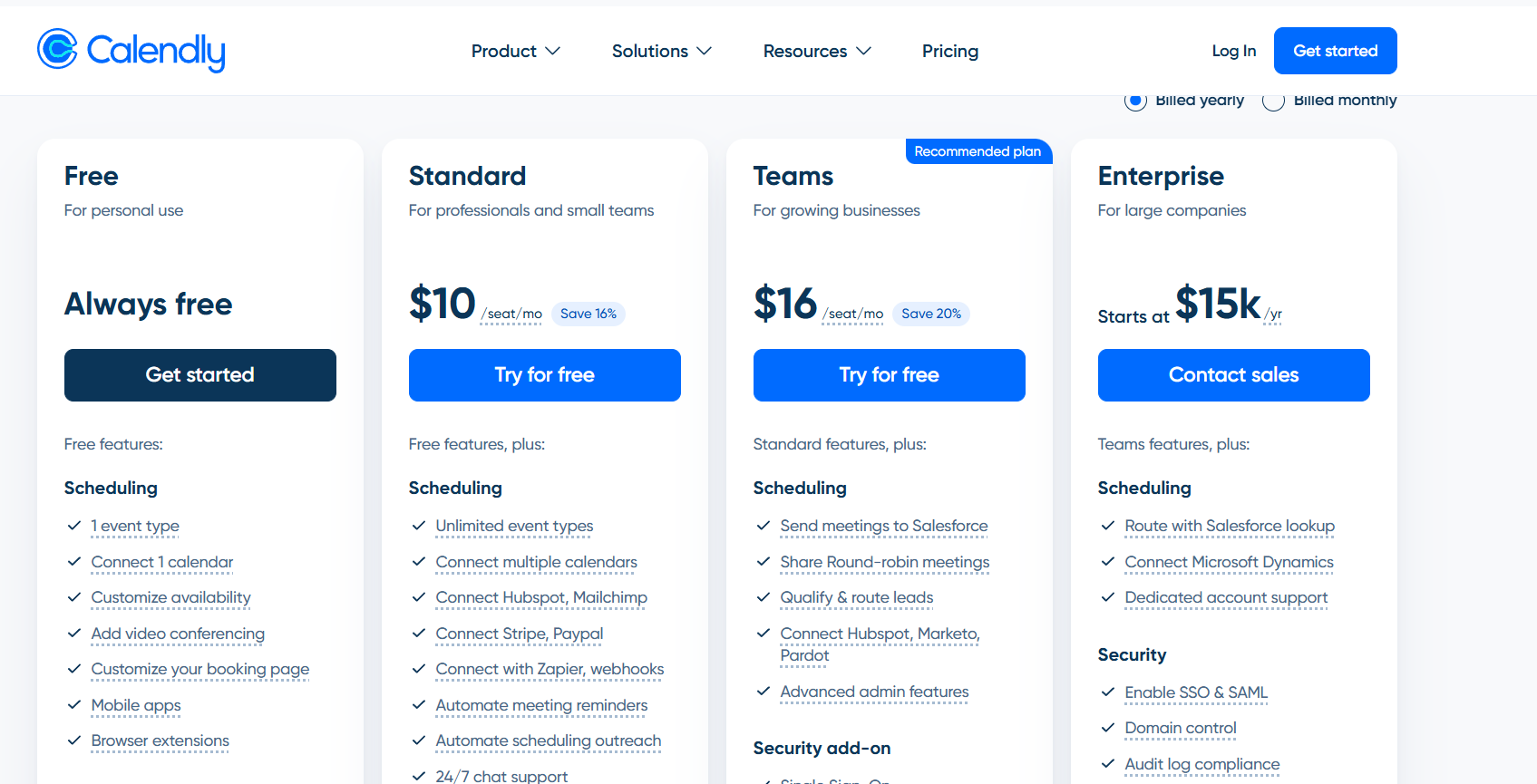
Pricing
Free plan available.
Pros vs Cons
| Pros | Cons |
|---|---|
| Saves time scheduling | Limited customization |
| Easy to use |
20. Zapier
Best for: connecting apps and automating workflows.
Product overview
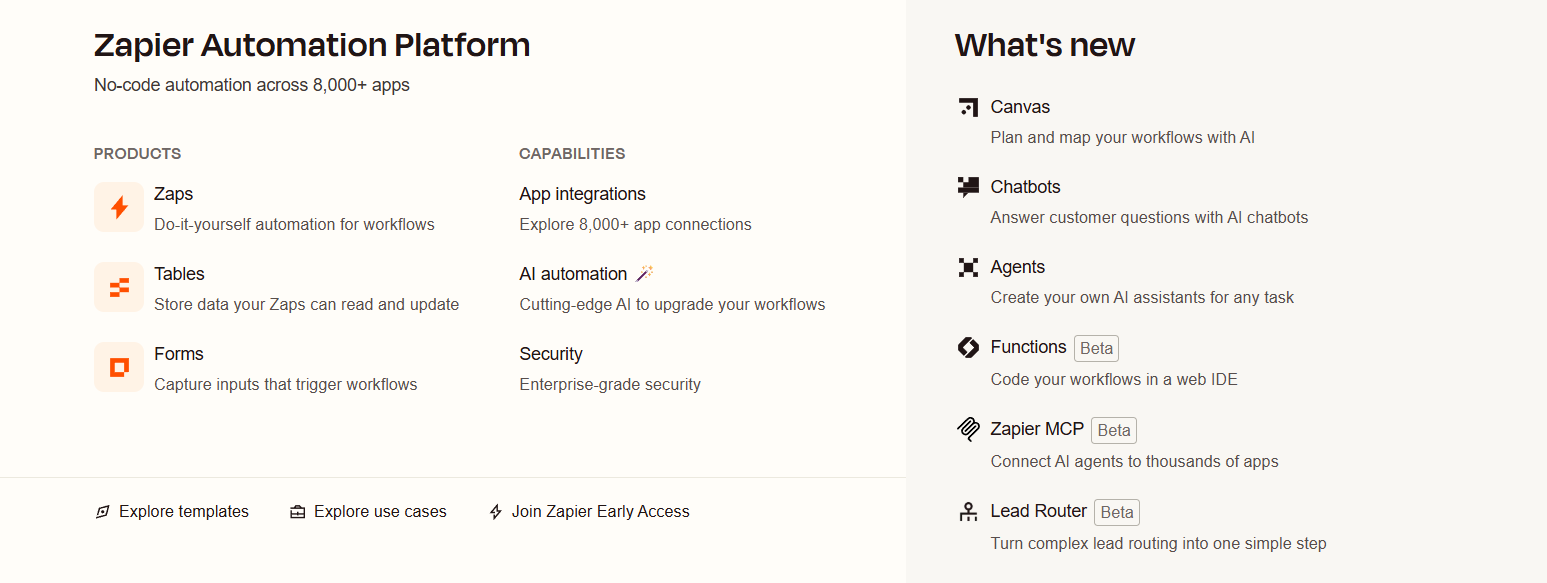
Zapier connects thousands of apps so they work together automatically.
For example you can automatically:
- add form leads to a CRM
- send welcome emails
- create tasks in project tools
Key features
- multi-step automation
- app integrations
- workflow templates
- triggers and actions
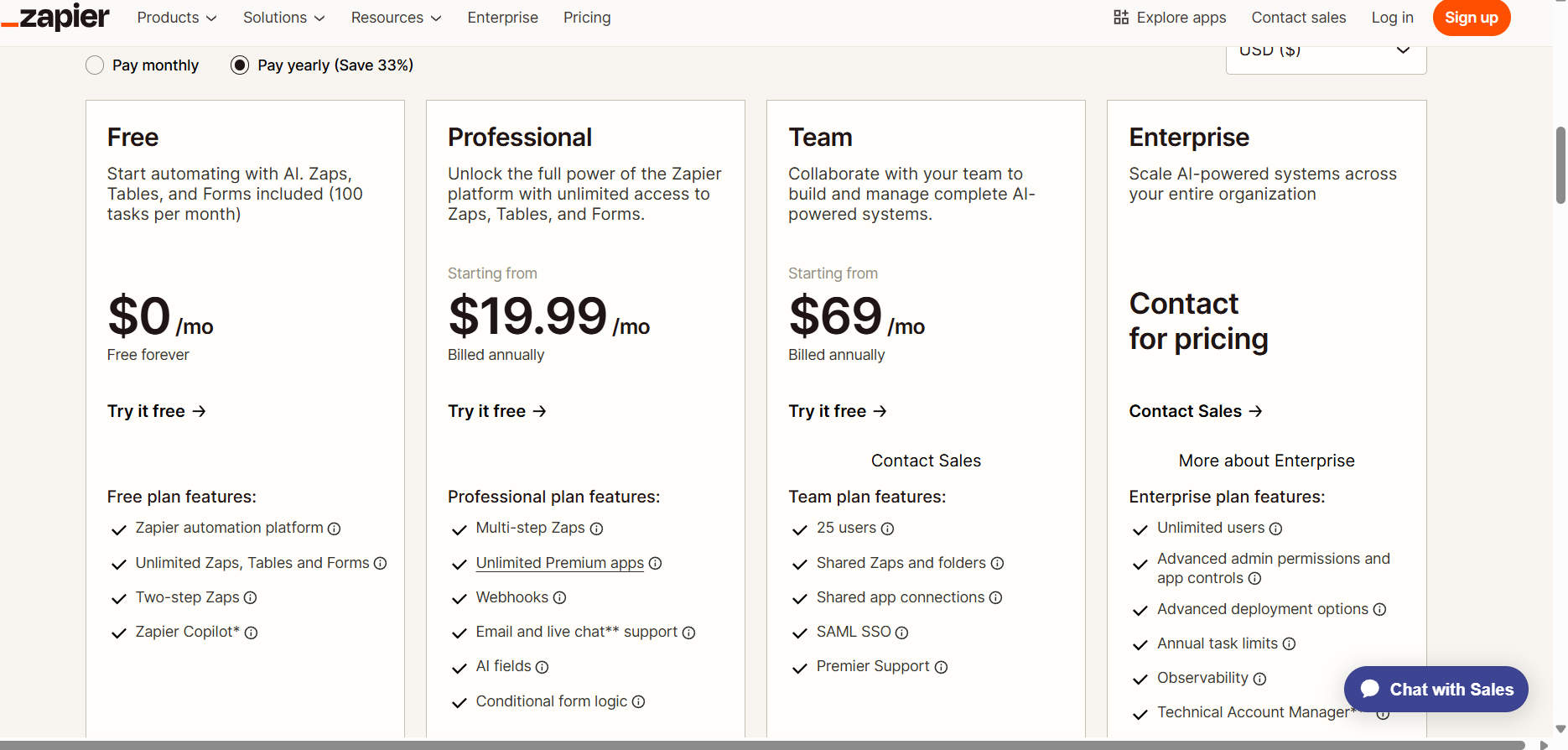
Pricing
Free plan available.
P
What’s wrong with it?
Common review complaints:
- pricing increases quickly with automation volume
- complex workflows can become confusing
Unique selling position
Zapier connects over 6000 apps, making it the largest automation ecosystem.
Benefits
- eliminates repetitive tasks
- integrates most business tools
- improves productivity
Pros vs Cons
| Pros | Cons |
|---|---|
| Huge integration ecosystem | Pricing scales quickly |
| Powerful automation | Can be complex |
Tech Stack for Solopreneurs Starting From Zero
Many solopreneurs try to use too many tools at once.
That leads to complexity.
Instead, start with a small tech stack that grows as your business grows.
Stage 1 — Essential Tools
Focus on organization and productivity.
Recommended stack:
| Category | Tool |
|---|---|
| Productivity | Notion |
| Website | Hostinger |
| Design | Canva |
| Sender |
Stage 2 — Growth Tools
When you start getting clients:
| Category | Tool |
|---|---|
| CRM | HubSpot |
| Email marketing | ConvertKit |
| Payments | FreshBooks |
| Scheduling | Calendly |
Stage 3 — Scaling Tools
When your business grows:
| Category | Tool |
|---|---|
| SEO | Semrush |
| Automation | Zapier |
| AI | Jasper |
Free vs Paid Tools
Many solopreneurs start with free tools.
Good free options include:
- HubSpot CRM
- Canva
- Notion
- Sender
- Grammarly
However, paid tools become worth it when:
- your audience grows
- you need automation
- you need advanced analytics
Buyer’s Guide: How to Choose Solopreneur Tools
Before choosing any tool ask:
- Does it save time?
- Does it automate repetitive work?
- Does it scale as my business grows?
Avoid buying tools just because they are popular.
Focus on tools that solve real problems in your workflow.
FAQ
What tools do solopreneurs need?
Most solopreneurs need tools for email marketing, project management, design, finance, and automation.
What is the best CRM for solopreneurs?
HubSpot CRM is one of the best because it offers a generous free plan.
What is the best email marketing tool for solopreneurs?
ConvertKit is widely used by creators and solo founders.
What is the best free design tool?
Canva.
What is the best automation tool?
Zapier.
Do solopreneurs need SEO tools?
Yes. SEO tools help bring free traffic to your website.
Are AI tools necessary?
Not required but extremely useful for content creation.
What is the cheapest way to start?
Start with free tools like Notion, Canva, HubSpot, and Sender.
How many tools should a solopreneur use?
Most solopreneurs operate efficiently with 5-10 tools.
Can one tool replace everything?
Not usually. Most businesses need a small stack of specialized tools.
Conclusion
Running a one-person business is challenging.
But the right tools can replace entire teams.
Instead of hiring employees, you can rely on software to handle:
- marketing
- design
- finance
- automation
- customer management
The key is not using the most tools — but using the right ones.
If you are starting today, begin with a simple stack:
- Hostinger (website)
- ConvertKit (email)
- Notion (organization)
- Canva (design)
- HubSpot (CRM)
Then expand as your business grows.
Used correctly, these tools can help a single person build a powerful and scalable online business.